


Topics in issue 165:
Overview: A week of computers, car trouble, Legislature, and meetings
Droidstar: Do you use Droidstar? Changes…
AllScan: The UCI200 is a powerful new device
AllStar: A Minimal ASL Node Without Asterisk Dependency (R&D)
M1KE: A use I had not thought of
M17: My M17-PNW reflector
M17: My little M17 hotspot, reloaded
HT: Yaesu FT-5DR split memory
44net: guide to using a TP-Link router
HamClock: Quadra backup battery arrived
Adware: Tom 1, adware 0, popups outsmarted
Short stack
Closing

Overview: A week of computers, car trouble, Legislature, and meetings
It’s been my week to battle with computers (and later a car), but at least they are platforms related to amateur radio. My M17 reflector stopped working and despite many hours of work, it still isn’t working right. And setting up a WIRES-X Personal Digital Node should have been easy since I’ve done it before, but instead, I ended up with a PDN that hears traffic but won’t transmit. This, too, remains an unresolved mystery.
Of course, this is also a high-intensity time in my day job, with the Washington State Legislature convening last Monday. I’ve already testified on one bill. I also participated in a couple of statewide meetings. My work life is a busy time, especially in January, February, and March.
So while those issues and my day job simmer along, I took a quick dive into something a bit different: PoC radios. PoC stands for Push-to-talk over Cellular. You’ll hear people say PoC is not real radio. It’s certainly not traditional radio. But it does use RF, even if it isn’t in the amateur radio spectrum. If the purposes of amateur radio are experimentation and communication, then in my view, trying PoC radios falls within that scope.
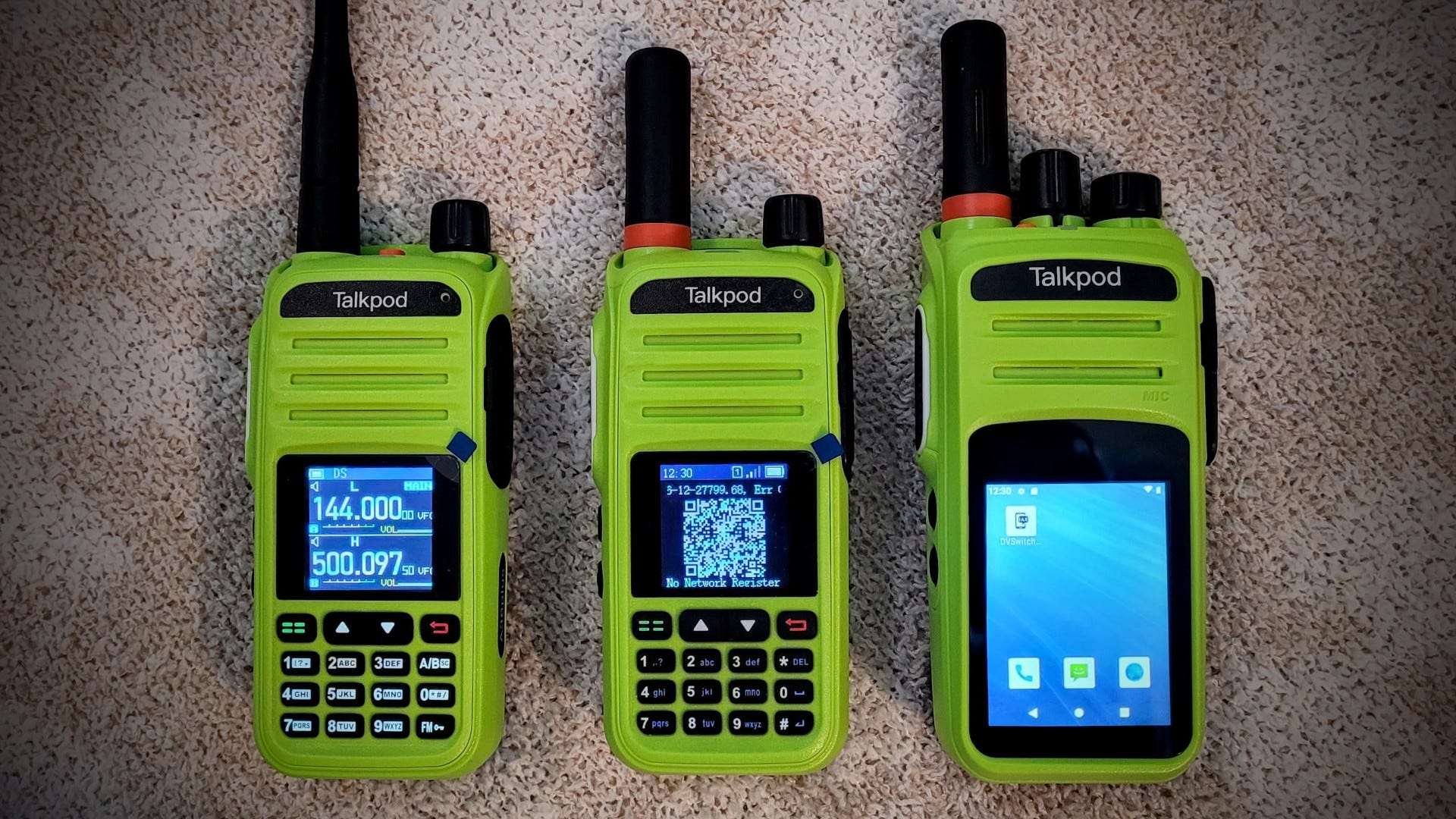
I took a quick look at two modern PoC radios. Learn more on the EtherHam site: Talkpod N39Plus and N58Plus PoC radios.
You might imagine that my ham radio workbench must be well organized and neat. I think this photo will burst that bubble. This has been my workspace this week while I fiddled with WIRES-X (loaded on the Lenovo ThinkCentre in the left corner, and the Yaesu FT-5D at top center), Talkpod radios (the lime green devices), and worked with a few AllStar nodes (the brown B-Tech UV-PRO radio at the top center). I’m pretty sure I’m not alone in having a chaotic workspace…at least, I like to think so!
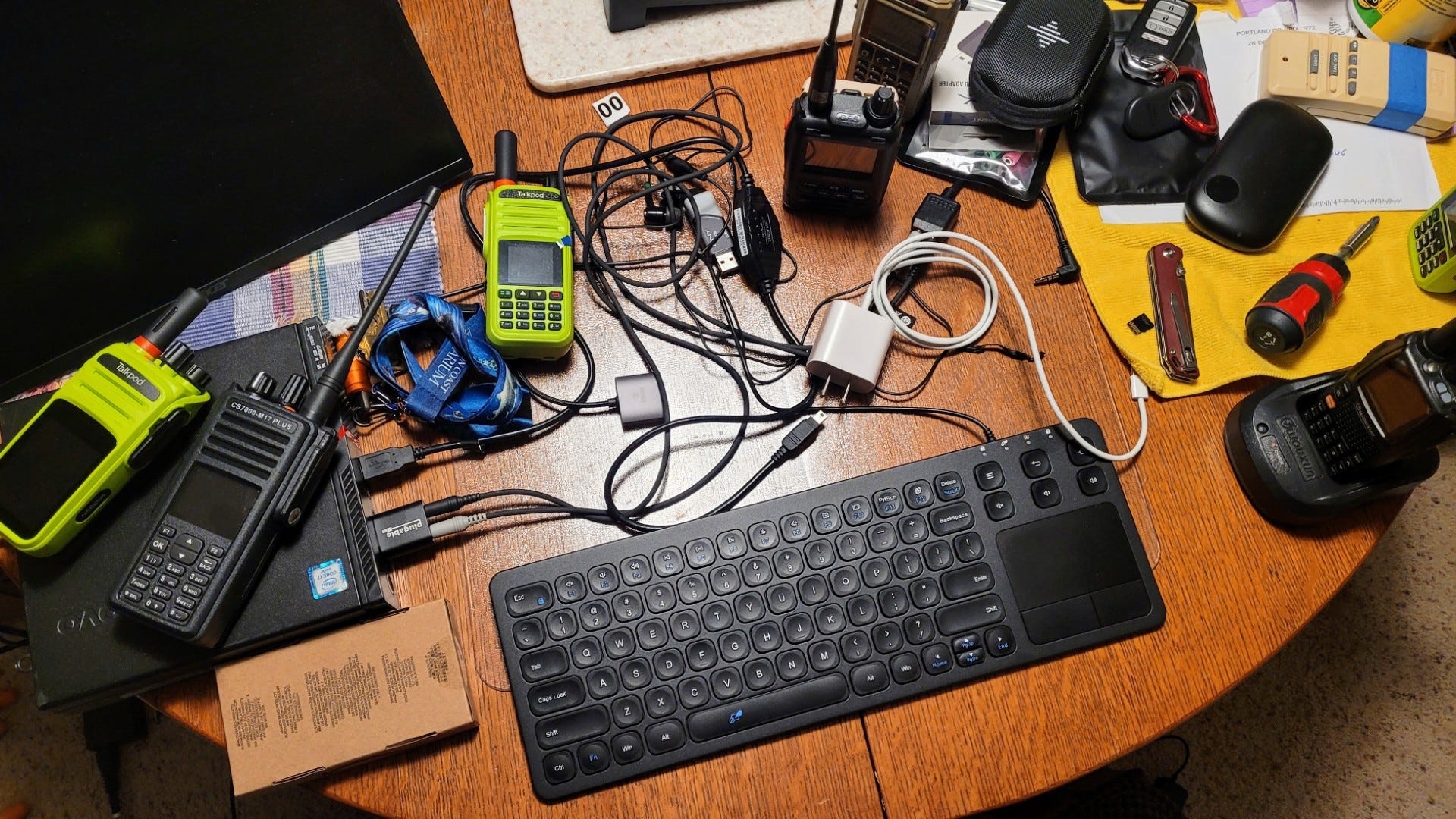
I share some of these details because the Random Wire newsletter is not just focused on technical reviews, how-to guides, or current news and interesting items. It also includes some of the more human aspects of pursuing amateur radio while also taking care of all the other things that come with being alive. That’s why you see my messy bench and hear about some aspects of my not-radio life in this newsletter. We all have a lot going on. Hearing from each other about our lives adds depth and value to our radio relationships.
Finally, maybe you aren’t a licensed amateur radio operator…yet. Here is a great overview of what it means to be licensed at different levels and some resources to help you get there: Licensing Your Way into Ham Radio Prepping
Droidstar: Do you use Droidstar? Changes…
This news isn’t great if you are an Android user, but it’s wonderful if you use iOS!
From https://github.com/rohithzmoi/Droidstar-DMR:
I will no longer be maintaining the Android version, at least for the near future. Due to the complexity of maintaining both iOS and Android versions simultaneously, I've made the decision to focus exclusively on iOS development.
And bullet points from that link are shown below, quoted without using the Substack quotation system because Substack doesn’t deal with bullets and quoting at all well.
…begin quote…
I’m thrilled to announce a major update with significant improvements and highly requested features:
Complete Major Design Overhaul: Fresh UI, smoother navigation, and a much cleaner overall experience that modernizes the entire app.
Dynamic Island Support for iOS: One of the most requested features! You can now monitor activity and status right from the Dynamic Island, providing at-a-glance information without opening the app.
iPhone Notification Center Display: Real-time TX/RX status updates are now visible in the notification center, keeping you informed even when multitasking.
Lock Screen TX/RX Display: Monitor transmission and reception activity directly from your iPhone’s lock screen for ultimate convenience.
Control QSO Log Length: Adjust how many entries you want to keep directly from the QSO page without digging into settings. Customize your log management with ease.
Toggle Self-TX Logging: A small but powerful quality-of-life improvement for those who prefer cleaner logs. Turn self-transmission logging on or off based on your preference.
…end quote…
AllScan: The UCI200 is a powerful new device
If you were waiting for a device that can do almost anything (yes, that is hyperbole, but not far from the truth), check out the new UCI200 USB Communications Interface.
The UCI200 is the first USB interface that not only supports Radio and Radio-less interface modes, but also supports 2 Pass-Thru modes enabling the mic to be directly connected to the radio, and supports a Bridge mode allowing the radio, the mic and speaker to be simultaneously connected to the USB host.
With the UCI200 the 4 use cases mentioned above are now all easily supported with a single front-panel slide switch. Before the UCI200, to support all those cases would have required manually unplugging the mic and moving it back and forth between the radio and other devices and/or having multiple interfaces and/or mics, radios, cables, antennas, switchboxes, etc.
To fully support a wide range of mics and radios required yet another industry-leading innovation – the integration of the AllScan MA1 Mic Adapter into the UCI200, and creation of an open-source hardware standard for small 10×18mm adapter PCBs that allow literally any brand or model of communications mic to be plugged in, supplied with any DC Supply Voltage from 5-14V and/or any Mic Bias source from 2V/2KΩ to 5-14V/600Ω while also passing through button-press/serial data lines to a secondary RJ45 jack that connects to the radio’s mic jack such that the mic keypad functions can be used as normal with the radio to enter frequencies, select channels or send DTMF tones.
Find much more information on the detailed product page at https://allscan.info/products/uci200/ and order from https://allscan.info.
Also, you might be wondering about what it means to have a full duplex ASL node like the AllScan ANF101. Freddie Mac to the rescue!
AllStar: A Minimal ASL Node Without Asterisk Dependency (R&D)
Source: A Minimal ASL Node Without Asterisk Dependency (R&D)
This is something new, exciting, and in active development. I am very interested in seeing where this goes and where it may take us. A lightweight system for ASL could expand the use and utility of AllStarLink for radio-less, lightweight systems.
Find repos on GitHub are at: https://github.com/Ampersand-ASL
M1KE: A use I had not thought of
One of our local hams is vacationing in Mexico, in a small coastal fishing town. We have a very informal morning net around 6:30 or 7:00 am and he has been a regular participant. It was a wonderful delight to hear him on the net this week, participating from his deck overlooking the bay…in Mexico.
Wait a minute, you say — he’s a U.S.-licensed amateur operating in Mexico? Let’s examine that. He’s not using any frequencies that are reserved for radio amateurs because he’s connecting over WiFi to his cell phone as a hotspot. His transmissions are coming to us via the internet to our local WIRES-X repeater.
I am not a lawyer, but this seems as legal as using your cell phone in Mexico. The beauty of this is his M1KE is easily transported, has a long-lasting battery, and his audio sounds great.
If you travel, the M1KE might be an excellent travel companion because you get multiple digital modes and easy connections over WiFi. This really hits home for me because I struggled to keep in touch while my spouse was in various hospitals and skilled nursing facilities. If I had had an M1KE then, it would have been easy. (And I note in passing that PoC radios over cellular and/or WiFi also provide this kind of utility.)
To other radio amateurs, digital audio over internet, connected through one of several digital modes, sounds like you are operating in amateur-reserved space. This is a great benefit to the radio amateur and to the community they usually operate in, especially when traveling or in restricted environments.
M17: My M17-PNW reflector
It’s been a while since I logged in to update my M17 reflector at m17pnw.net. First, I checked in on the status of the reflector at https://dvref.com/mrefd/m17-pnw. Uh oh, problems. It had not been validated for several months and metadata was not available. It’s running, but connections are failing.
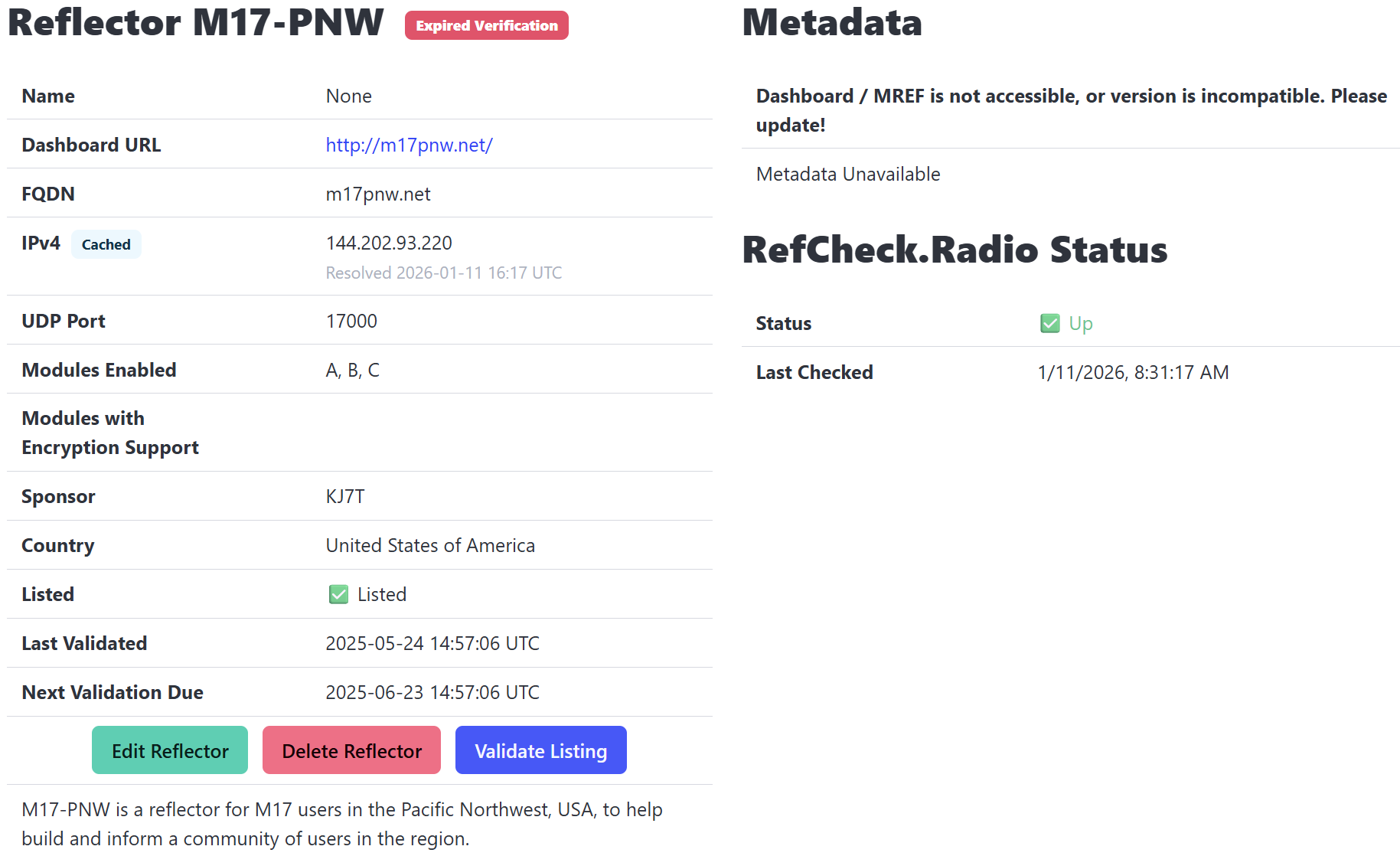
When I logged into the server, I found problems. The system would not update, and access to the dashboard via the web was failing. In the terminal, I got several “failure to resolve” errors when trying to access repo mirrors.
These symptoms point to a problem with DNS. I checked with my domain registrar and all looks fine on their end (i.e., nothing had changed). Next, I looked at my host (Vultr.com) and started scribbling some notes. Yes, it was time for a support ticket.
While I waited for support to get back to me, I also checked the m17pnw.net DNS records with this tool: https://dnschecker.org/
Two days of back-and-forth with support finally resolved the issue. The server was pointing to the wrong nameserver. I manually changed /etc/resolv.conf to correct the error. I have no idea what caused the nameserver to change.
The mrefd service is running (but the site is still not displaying the web interface):
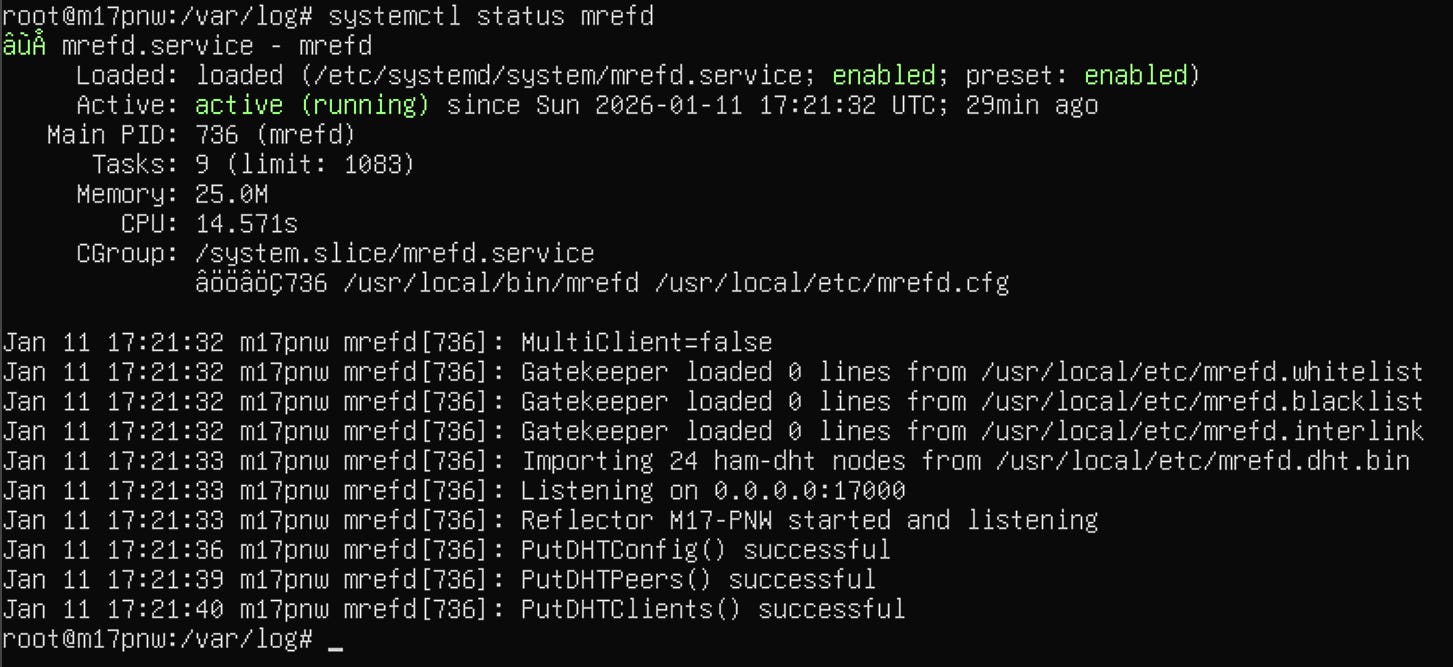
(This situation highlighted for me that these cloud hosting services sometimes provide minimal support. In the long run, that is educational for me. In the short term, it means more downtime than I would like. When the server goes down or malfunctions, it means two things: users are affected, and my time gets diverted to resolving the problem.)
I’ve had problems with this particular M17 reflector build so it may be time to switch to a different package. (M17 experts —> got recommendations?) Meanwhile, I reinstalled the system, starting with Debian 12 as the base operating system. I used these packages from GitHub:
gomrefdash depends on Go: https://go.dev/doc/install
It’s working. I see the gomrefdash (“Go Mref Dash”) dashboard but it is not showing any of the three modules I configured. (It did before.) However, DVRef shows the mrefd system is up and responding:
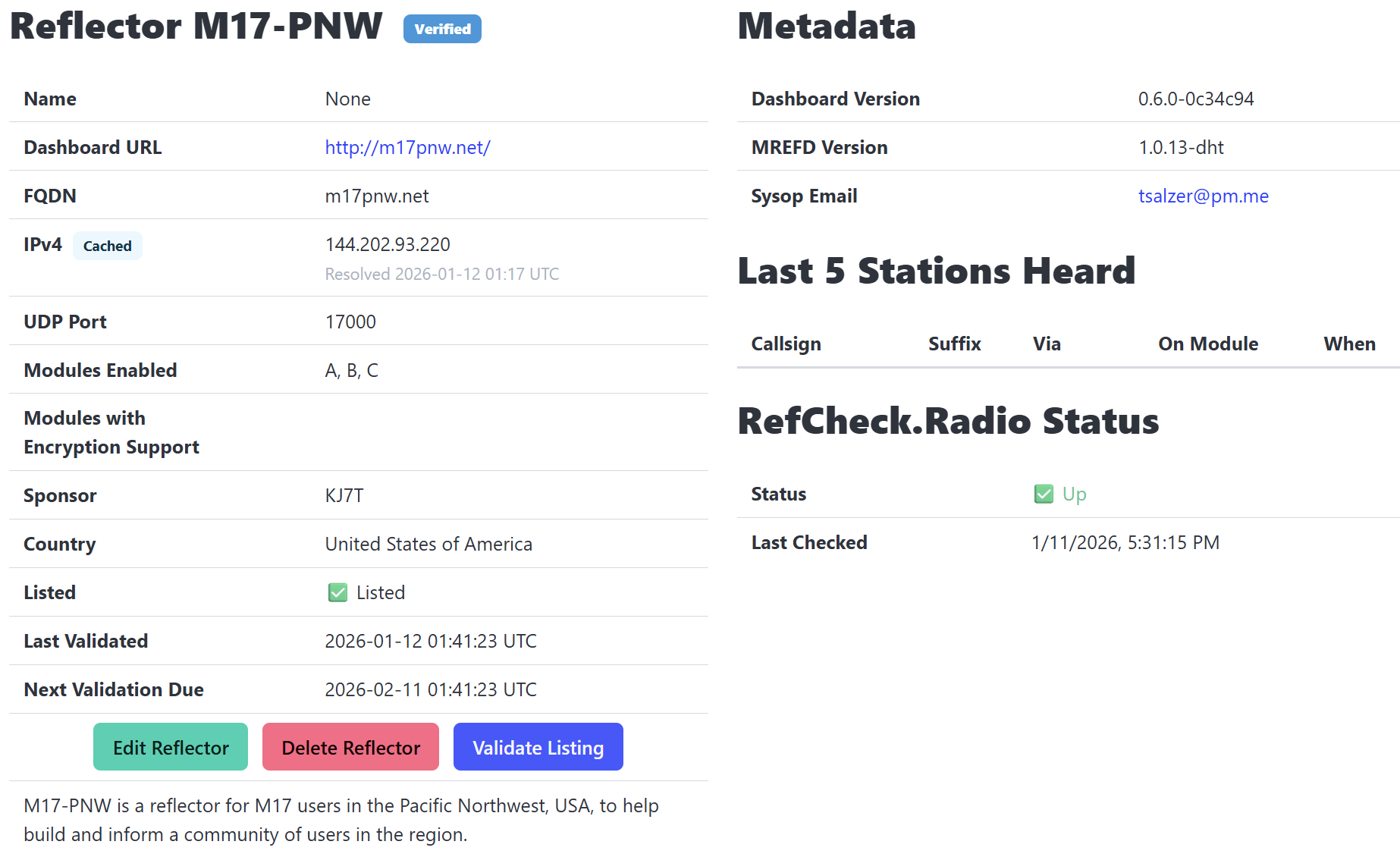
I no longer have an mrefd problem — I have a dashboard problem. A few more tweaks and the dashboard at https://m17pnw.net/ seems to be working correctly, more or less. Many thanks to Thomas N7TAE for testing the reflector dashboard. I got in and tested it, too.
One oddity of gomrefdash is when it is started in a terminal session, it doesn’t gracefully drop into the background. It takes over the session. This would usually mean stopping the gomrefdash instance if I want to do any updating or modifications. However, as long as I’m not touching gomrefdash itself, I run it in a screen session so that I can still use the terminal. That works well.
M17: My little M17 hotspot, reloaded
The little hotspot I use only for M17 stopped working. I suspect I inadvertently removed power and the backup battery for the device eventually died. This time, it cooked the bits on the microSD card.
I pulled out a larger microSD card from the parts bin and used the Raspberry Pi Imager app to install the WPSD M17 Community Fork. After configuring, it isn’t hearing my CS7000-M17 radio. Hmmm.
I struggled with this for a while, and finally decided to try flashing a modem firmware upgrade. The WPSD software makes this easy: Admin —> Advanced —> Tools —> Modem Firmware Upgrade. This is explained in the WPSD manual. That worked, taking my modem up to 1.6.1:
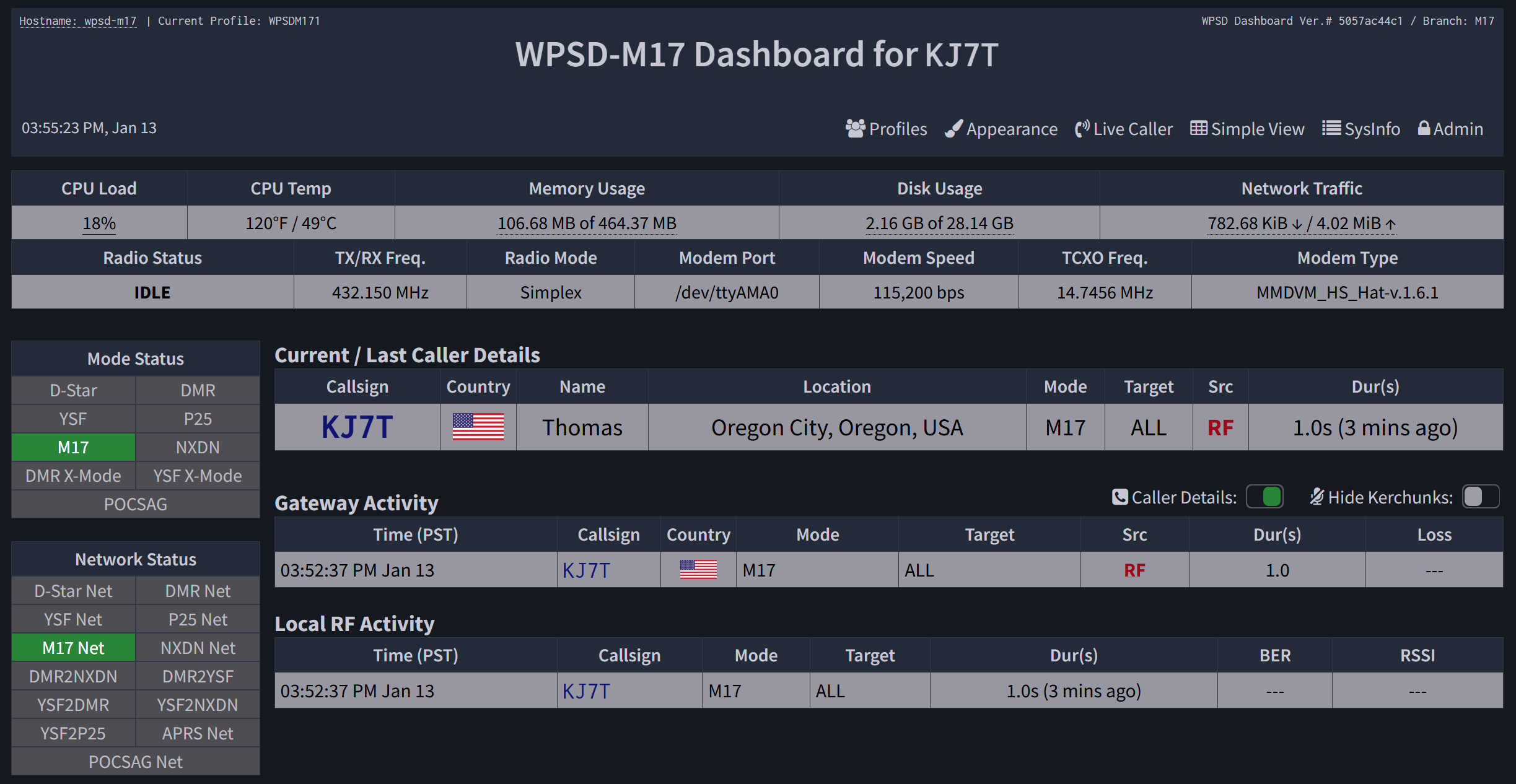
Finally, my little M17 hotspot works again. I verified this in my reflector dashboard at http://m17pnw.net:
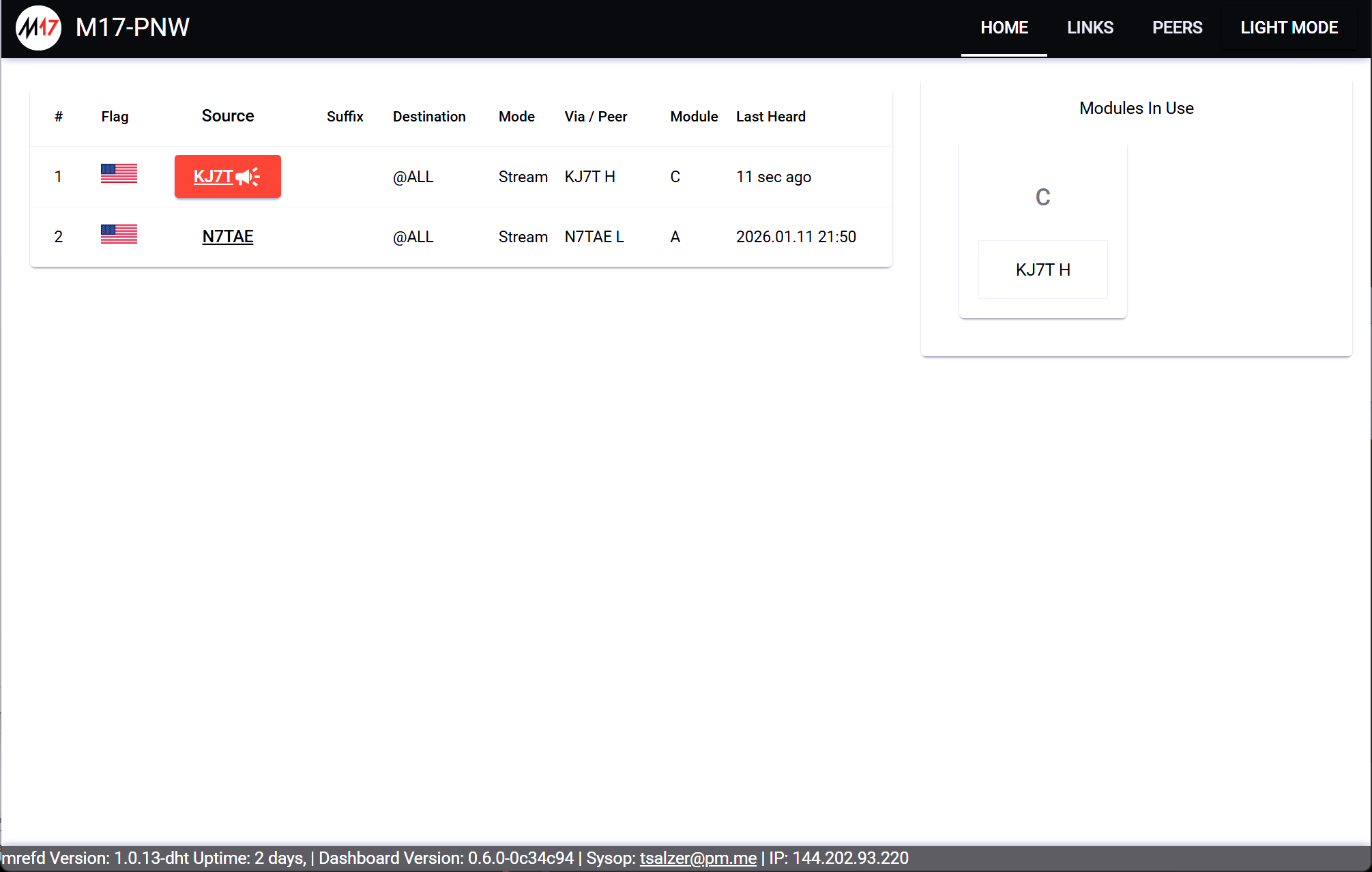
I’m going to want to update my CS7000-M17 and CS7000-M17 Plus radios. How:
Where to get files? Getting the Latest M17 Firmware.pdf
What tools to use? Using Factory Tool M17 PLUS DMR&OPNRTX V1.0.pdf
Updating process: Updating M17 Firmware.pdf
I haven’t done this yet.
HT: Yaesu FT-5DR split memory
Well, I blew it. I reset the Yaesu FT-5DR while trying to get WIRES-X to work through the radio, but I thought I had backed up all frequencies to the microSD card. I had not. Sigh. I have the data file on my server, but the programming cable is 150 miles away. This means setting up the radio through the radio’s menus. Fortunately, that is not difficult.
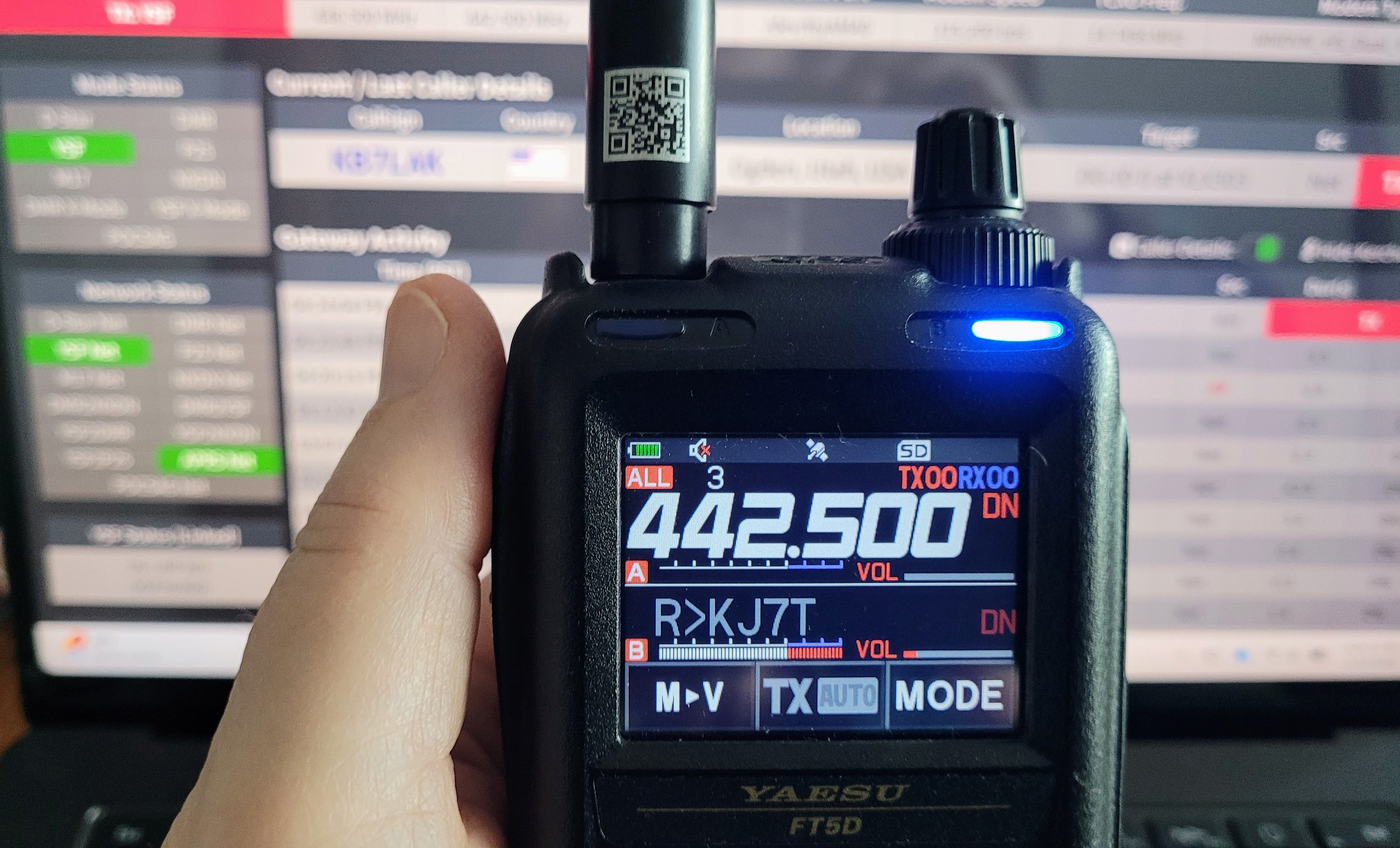
I had previously set up the FT-5DR for my hotspot in duplex mode. This means I transmit on VFO A and receive on VFO B. Saving the two VFOs to one memory is not obvious. Here’s how to do it, according to the advanced manual for the FT-5DR:
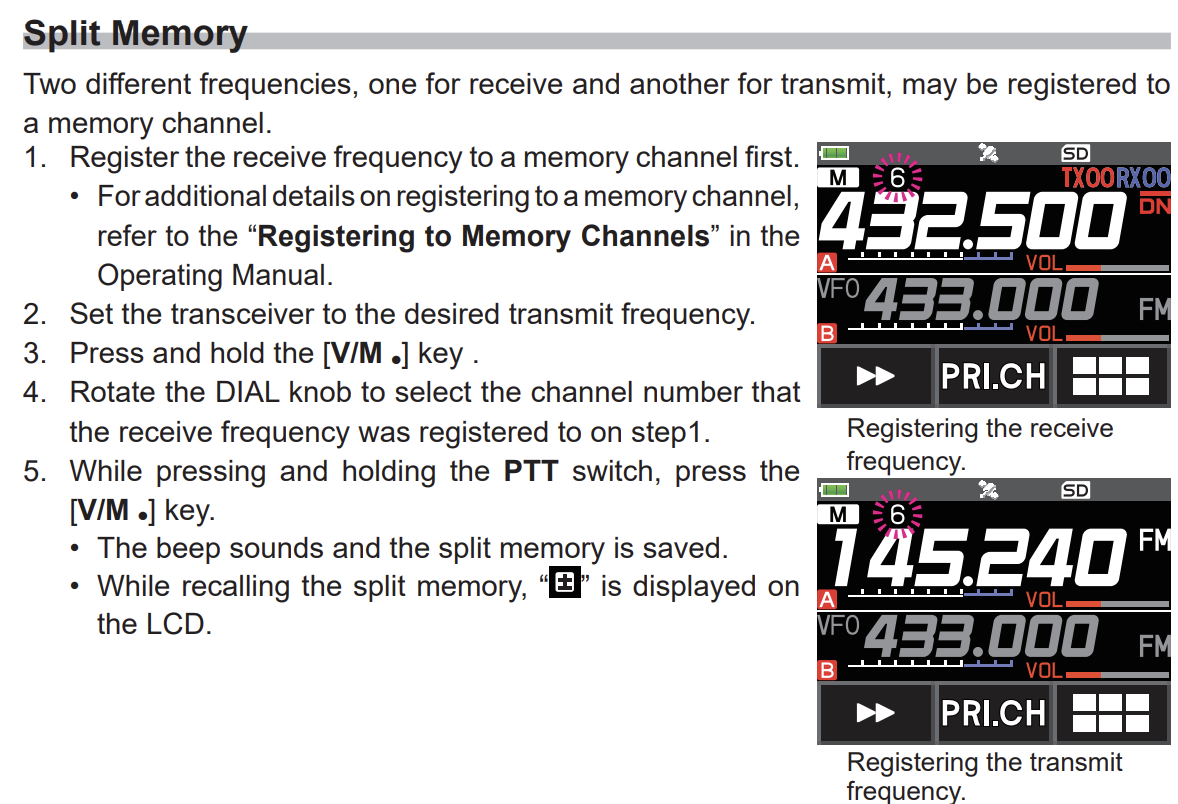
Here, my FT5DR is set to transmit on VFO A and receive on VFO B. Volume is turned down to zero on VFO A.
44net: guide to using a TP-Link router
Ooh, this is nice: a guide to using a TP-Link router behind an ISP’s router/modem to connect some local hosts with your 44net addresses. Find the guide in PDF at: https://ardc.groups.io/g/44Net-connect/files/OpenWRT%2024%20-%20TPLink.pdf
HamClock: Quadra backup battery arrived
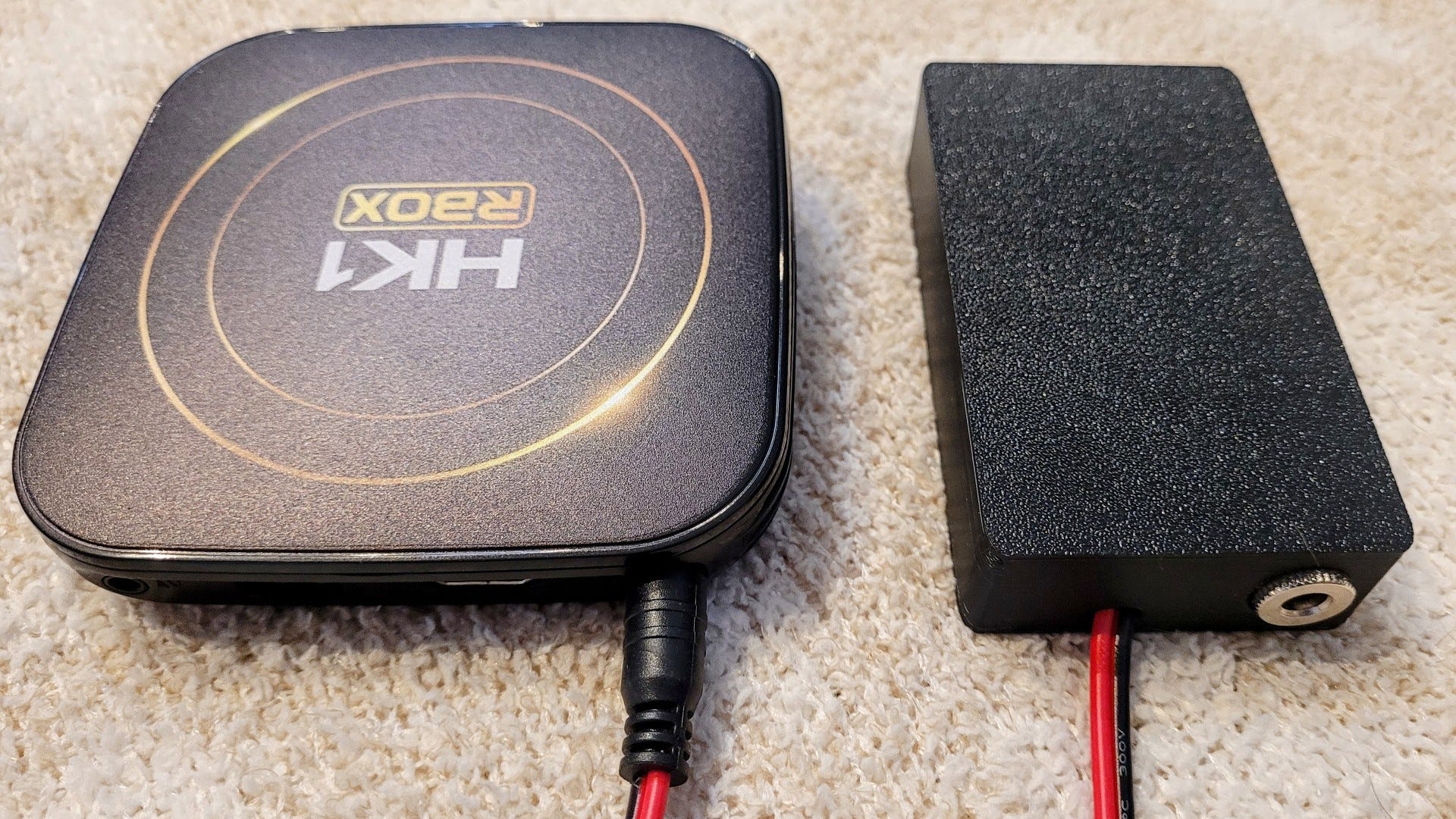
I’m liking this little battery. It was plug-and-play: the battery with a barrel connector that goes to the Quadra, and a barrel connection where the power supply connects to the battery. Done.
This Plug and Play Battery Backup has a build in LiPo battery with 3000mAh capacity. It simply splices between the original power supply and the QUADRA or HK1 RBOX. It will provide several hours of back up power.
I can attest that it does provide hours of backup for the HK1 RBOX. Get one for $25:
In my case, I wanted to see how the HK1 RBOX would work, so that’s what I used for my HamClock. (My write-up is at I made my own HamClock and it was easy.)
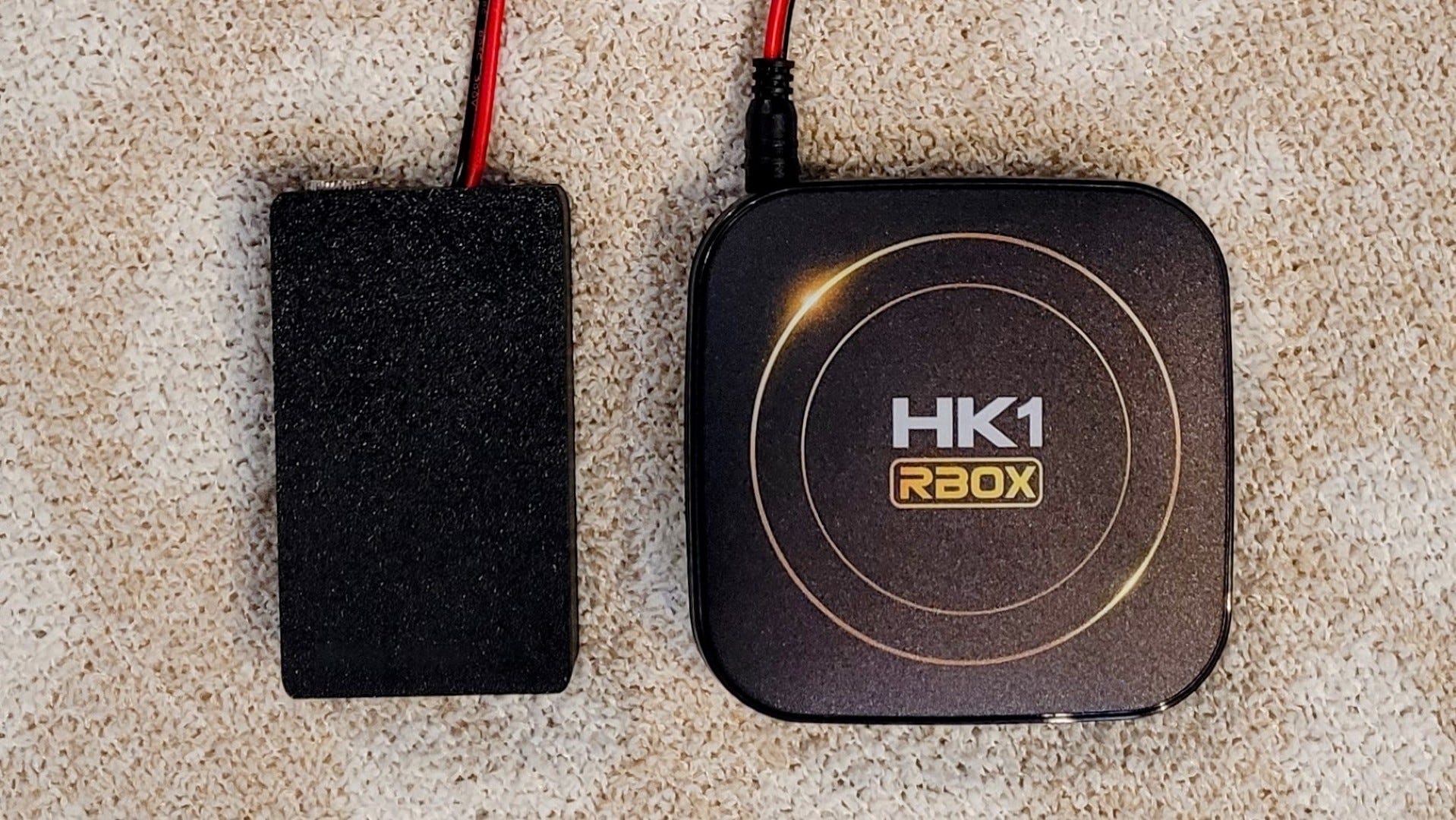
I picked up a barrel-to-USB adapter, too. The battery puts out 5VDC, just what a Raspberry Pi needs. Yes, you’ve guessed it: I’m going to try this on one of my Raspberry Pi hotspots. The battery can handle a maximum 2-amp peak draw and 0.6 amps continuous at 5VDC.
The battery should support a Raspberry Zero 2W (see https://raspberrytips.com/how-to-power-a-raspberry-pi/ for more about power requirements for all Raspberry Pi models). Unfortunately, this spiffy device doesn’t support the higher amperage draw of Raspberry Pi 3, 4, and 5 models.
Adware: Tom 1, adware 0, popups outsmarted
I browse a lot of websites. It shouldn’t be a surprise that I found two different PUPs (Potentially Unwanted Programs) on my PC. I use Malwarebytes (paid subscription) which was popping up a warning every few seconds that these PUPs were trying to contact a distant website. Malwarebytes was automatically blocking those outgoing connections, so that was good. But the constant popups were driving me crazy (crazier?) and that wasn’t good.
I ran some scans, performed some cleaning routines, flushed the browser cache, flushed my local DNS cache, and rebooted. Those steps did not work. I set my NextDNS profile to block the two web URLs, but Malwarebytes was still notifying me of the attempts. So I went old school and edited my Windows host file to redirect those website addresses to localhost. This effectively stopped the popups.

Helpful guidance on how to do this is available at https://woshub.com/block-domains-websites-windows-firewall-powershell/. Another resource is https://www.inmotionhosting.com/support/website/modifying-your-hosts-file/.
Alternatively, you could install a browser extension like Redirector for Firefox or Redirector for Chrome. I hope this information this saves some subscribers from the frustration of a PUP notification every few seconds for hours on end.
Short stack
Elecrow ThinkNode M3 available for $39.90. This is a slim, pocket-size Meshtastic tracker with GPS, up to 16 hours of battery life, and some environmental monitors. Got a boat or RV parked somewhere, even in your driveway? This might be the least expensive way to monitor temperature, humidity, and location. (Yes, I ordered one to try on the boat! I’ll let you know how it works.)
Rdiffweb 2.11.0 released. “This update brings several major additions that improve security, administration, and usability for both small deployments and large backup infrastructures.”
I built a firewall that blocks my IoT devices from phoning home. This interests me because of the hardware and because I don’t like the idea of my cameras and switches and bulbs connecting to outside resources.
6 New GL.iNet Devices You NEED to See from CES 2026 (Reddit).
Microsoft says you should upgrade to Windows 11 AI PCs if you want to be prepared for the next generation of computing. Ugh. No. File this one under unwanted changes.
My Roku TV was becoming extremely slow to respond to inputs. The problem? My TV cache was full. (Yes, your smart TV has a cache!) I found the solution for my problem at How to clear your Roku TV cache (and say goodbye to slow performance).
A couple of interesting articles on Make Use Of surfaced recently: This free open-source tool is the fastest way I’ve found to make diagrams and WinRAR feels ancient once you switch to this modern open-source alternative.
I ditched my browser’s bookmarks for Raindrop.io, and I finally feel organized interested me because I use Raindrop.io to capture items for this very Short Stack section!
I’ve been looking for a way to put a weather station up at my sister’s house without penetrating the roof or putting the sensors right beside the propane stove stack. Found a good solution on Amazon (affiliate link): Adjustable Starlink Gen 3 Roof Ridge Mount, Ybervont Starlink Mounting Kit Gen 3 with 0-30° Adjustable Starlink Gen 3 Pipe Adapter, Starlink Roof Mount Kit for Starlink Internet Kit Satellite, Black for $69.98. That seems pretty reasonable for a mount that ought to work for a relatively lightweight solar/WiFi weather station. (Note that sister’s house is not in a high wind location. I probably wouldn’t use something like this if we were in Kansas!)
Closing
What an interesting week. My wife and I watched some incredible college football games. This is something my wife used to do with her father, and I did with my father. Both of our father’s walked on some years ago, so watching football together also meant we were honoring and remembering them.
We also picked up my daughter’s car, nicely repaired after the car struck a deer in the dark a few weeks ago. The damage didn’t look like much but I knew it was going to be more expensive than we first thought. The final bill was nearly $5,000. I’m glad my deductible was $500 instead of $1,000! We drove it home and a few days later, when we went to use it: click, click, click. The battery was low (8.7 volts) so I charged it. Activated the starter again: click, click, click. It turns out there is a known issue documented with a service bulletin about this particular vehicle that involves a failing ground when the grounding stud is painted or clear coated during a repair. I’m in communication with the collision center because our newly repaired vehicle is not drivable or usable at the moment. A week has gone by and the vehicle is still not usable and the collision center is not being responsive.
The Washington State Legislature convened on Monday, January 12th. This short, 60-day session promises to be packed full of stress and drama. The Governor’s proposed budget calls for cuts that would definitely affect the members of my statewide nonprofit association. We are tracking about 200 bills that could affect our members. I’ll be spending extra time “on the hill” this year. I testified in person on Wednesday on a bill about land acquisition.
And we have a local radio club meeting on Saturday. Maybe I can actually make this one. I hope so, if only to be surrounded by my radio friends for a few hours.
73 to all,

I corrected the AllScan UCI number from UCI120 to UCI200 after publication. Apologies to David NR9V of AllScan for mixing up those numbers!