


Welcome to Random Wire 173
It seems a bit shocking that the Random Wire is scratching an itch for more than 2,000 people. I started this as a way to help me remember what I was doing, and then I was encouraged to share those thoughts with others. I’m no expert — far from it. But I like learning and look forward to picking up new knowledge every day. That kind of curiosity seems pervasive within our great hobby of hobbies: amateur radio.
I am thankful for all subscribers. But we also share an identity: you and I are EtherHams. I know this because (a) the Random Wire is the newsletter for EtherHam.com, and (b) we all use the internet and computing in some fashion in our amateur radio activities. I don’t know a ham who does not use the internet in some fashion. I conclude that we are all EtherHams.
Those two things — learning new things and working on a computer-based radio system — came together this week. I spent a lot of time this week rebuilding my M17 reflector. Translation: most of my content this week is about that work! However, that long story isn’t shared in this newsletter. Instead, I documented my work in a detailed TechNote at EtherHam.com: TechNote 10: Installing an M17 Reflector on a Cloud Server. If you’ve been wondering what goes into standing up an M17 reflector, or maybe thinking about building one yourself, check out my step-by-step notes. You can see the finished dashboard for my M17-PNW reflector running at http://m17pnw.net/.
I also got some operating time with my new Icom IC-7300MK2 HF transceiver. I need more time to develop stronger views on the radio, but so far, it is working pretty well for me. The 10-meter band is incredibly noisy at the lake house, but I’ve been doing well on 15, 20, and 40 meters using an end-fed half wave antenna, with a little bit of 30-meter activity as well. More on that in a bit.
I hope you find something interesting in Random Wire issue 173. As always, please do let me know how you are doing, what questions or stories you have about amateur radio, and topics you may be interested in.
Here’s a question for you that goes beyond your job title or other short, dry descriptor: if you had a free day to do anything you want, what would that look like? For many of us, the answer would be: play on the radio!

I Suppose…
As I reflect on readers of this newsletter, I suppose that some have no idea what I’m writing about. This was made clearer for me after receiving a poignant note from a subscriber who told me her father had been a ham, and while she enjoyed the newsletter, she didn’t really know what I was talking about.
That’s a failure on my part. I’ve assumed that radio amateurs were my subscribers, but clearly, not all subscribers are licensed hams. I’ll try to develop the habit of providing better background information and context in future pieces.
It will also help me to share that foundational information as I will learn more, too. In this issue, you’ll find two footnotes to help provide background for a couple of items.
M17 Reflector Rebuilt
An updated version of mrefd — a system for running an M17 reflector — was released. My implementation (https://m17pnw.net/) had not been updated for months so I thought it would be a good idea to proceed with an update. However, I had previously chosen to use a Go-based dashboard and that system couldn’t be rolled back, so I destroyed (erased) the server and started over. Unfortunately, it did not go well, at least not immediately.
For background, see footnote 1: What is an M17 reflector?1
First, I started with a fresh install of Debian 12. I hit a bump when trying to enable FastCGI on the web server. After fighting that for a while, I destroyed that server and installed Debian 13. I encountered errors while trying to install packages. Turns out Debian 13 dropped the libopendht-dev library that mrefd needs. I had not previously realized this.
So: back to Debian 12. I think all in all, I installed seven Debian servers with mrefd. I could not get them to work. (To be clearer: mrefd was working but the web-based dashboard was not.) After spending hours with the hosting company tech support team, I finally decided to restore my backup of my previously working reflector. After running updates on the server, updating DNS, and checking firewalls, I initiated the mrefd instance.
But even though the previous version was running fine, I couldn’t let go of trying to figure out how to get the newer version installed. The short version of this story is I did figure it out. If you want the details, read TechNote: Installing an M17 Reflector on a Cloud Server.
You can see the M17-PNW reflector dashboard at https://m17pnw.net. I encourage M17 users to connect to the M17-PNW reflector to make sure it works! The new location feature is not working for me. I can’t tell if I misconfigured mrefd (possible) or if my iPad app (MSeven) is not reporting my location (likely, as the app privacy note for the app says no data is collected, and my iPad Mini does not have GPS on board). Thanks in advance for your help.
Antenna in the Tree & FT8
I picked up an end-fed half wave antenna and pulled the end up to a branch about 50 feet up the tall fir tree beside the house so I could work more HF stations.
For background, see footnote 2: What is an end-fed half wave antenna?2
This off-brand antenna is working okay. I tested it quickly on 10, 15, 20, and 40 meters. There was a lot of activity on the bands so I was able to listen to quite a few stations.
Speaking of antennas, I enjoyed this YouTube presentation of six newer antennas by Jason at Ham Radio 2.0 (I missed this when it came out in July 2025):
How did I get the EFHW wire up the tree? I have not finished my pneumatic launcher so I used an arborist slingshot. It shot a 15-ounce bag up about 50 feet, almost high enough.
Slingshot Arborist Throw Line Rope Launcher Sling Shot for Adults
I’ve since ordered a slightly lighter bag because the 15-ounce one is just a little too heavy to really get to the height I need. When I pulled my EFHW antenna into the tree, it didn’t go quite as far as it should have. I’m hoping the 11-ounce bag and a little more stretch on the slingshot will get me the height I need (just 10 more feet!)…once it stops pouring down cold winter rain!
Performance of the antenna improved when I added about 25 feet of stranded wire to the ground terminal on the EFHW balun. I connected that wire to a metal stake driven into the ground.
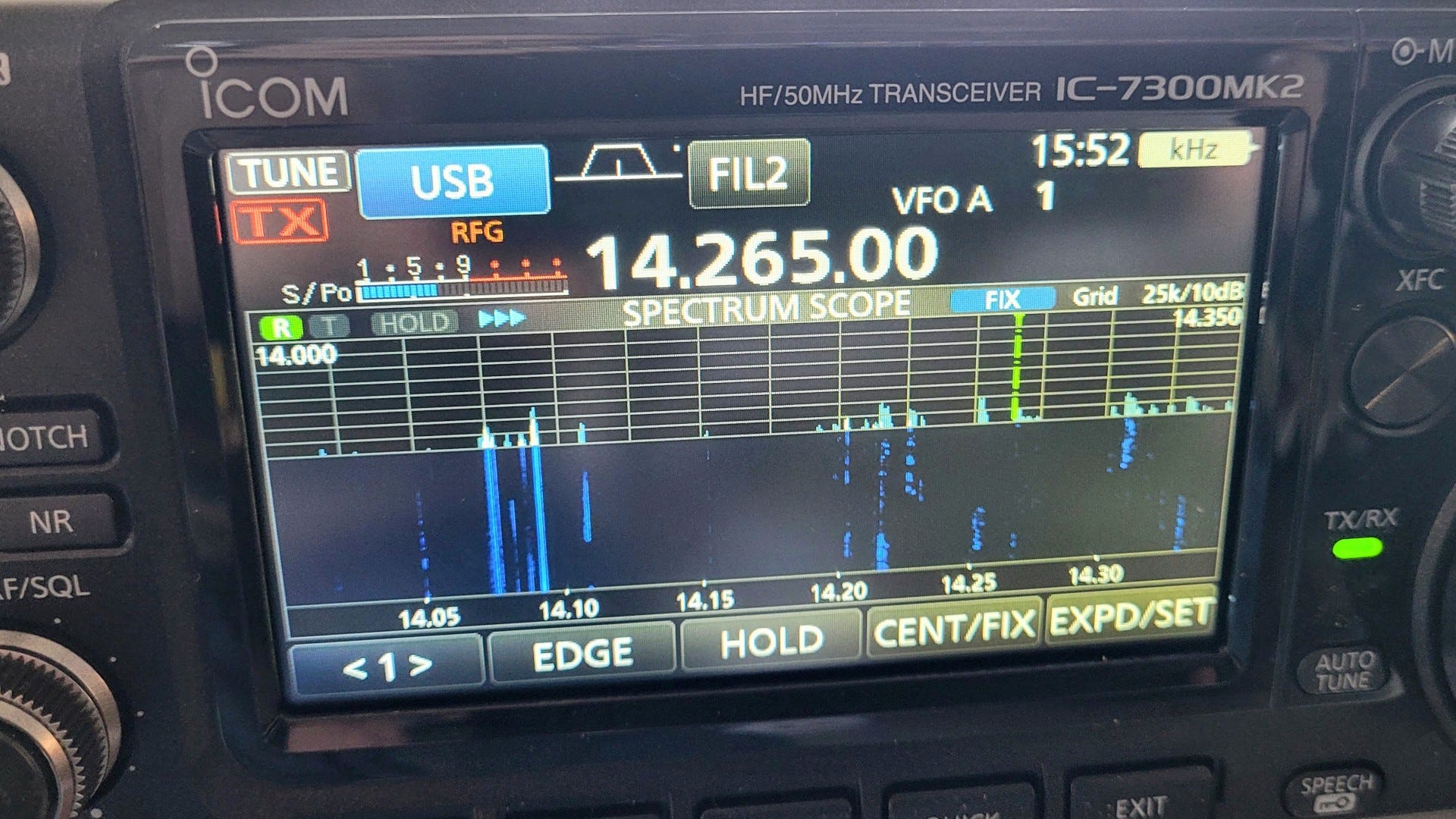
To test, I got FT8 going with 20 watts on the IC-7300MK2. For the WSJT-X and GridTracker programs, I’m using an old Panasonic CF-54 TOUGHBOOK running Windows 11 Pro. This worked great, once I got the programs configured and connected to my QRZ.com logbook.
I’m now designating this computer as my field computer for amateur radio. You can see what it looks like at this Amazon link:
Panasonic Toughbook 54, CF-54 MK3, Intel Core i5-7300U, 14.0 Inch HD, 512GB SSD, 16GB, Wi-Fi, TPM, Backlit Keyboard, Webcam, Windows 11 Pro (Renewed) (affiliate link)
Mine is the MK2 model. The MK1 model had a VGA port, which was replaced with an HDMI port in the MK2 and MK3 models.
Getting FT8 running on the IC-7300MK2 was an adventure because none of the directions I found online in YouTube videos and web pages worked. The gist I shared last week came close. I was able to figure out most of the settings from the gist, even though many of the descriptors for various settings did not exactly match the IC-7300MK2 radio.
Then I couldn’t identify the right COM port on the computer. I had downloaded the Silicon Labs driver from Icom, installed it, and rebooted my computer. The COM port was supposed to be identified by the Silicon Labs moniker. No COM port said anything about Silicon Labs, not even in the COM port properties. To figure this out, I finally uninstalled the driver, rebooted, and took a screenshot of the COM ports found by the Windows Device Manager. Then I installed the driver, rebooted, and compared the new, longer list against the screenshot. Two new COM ports showed up, saying just COM6 and COM7. I chose COM7 and that worked.
I thought it would be easier to get FT8 set up and operating on the IC-7300MK2. It wasn’t particularly simple. When I find some spare time, I’ll document all my settings in case it helps someone else. What I did do, once I got the radio working properly, was stick an SD card into radio and save a copy of the working configuration. That will make it much easier to get back to a working config if I change the settings later.
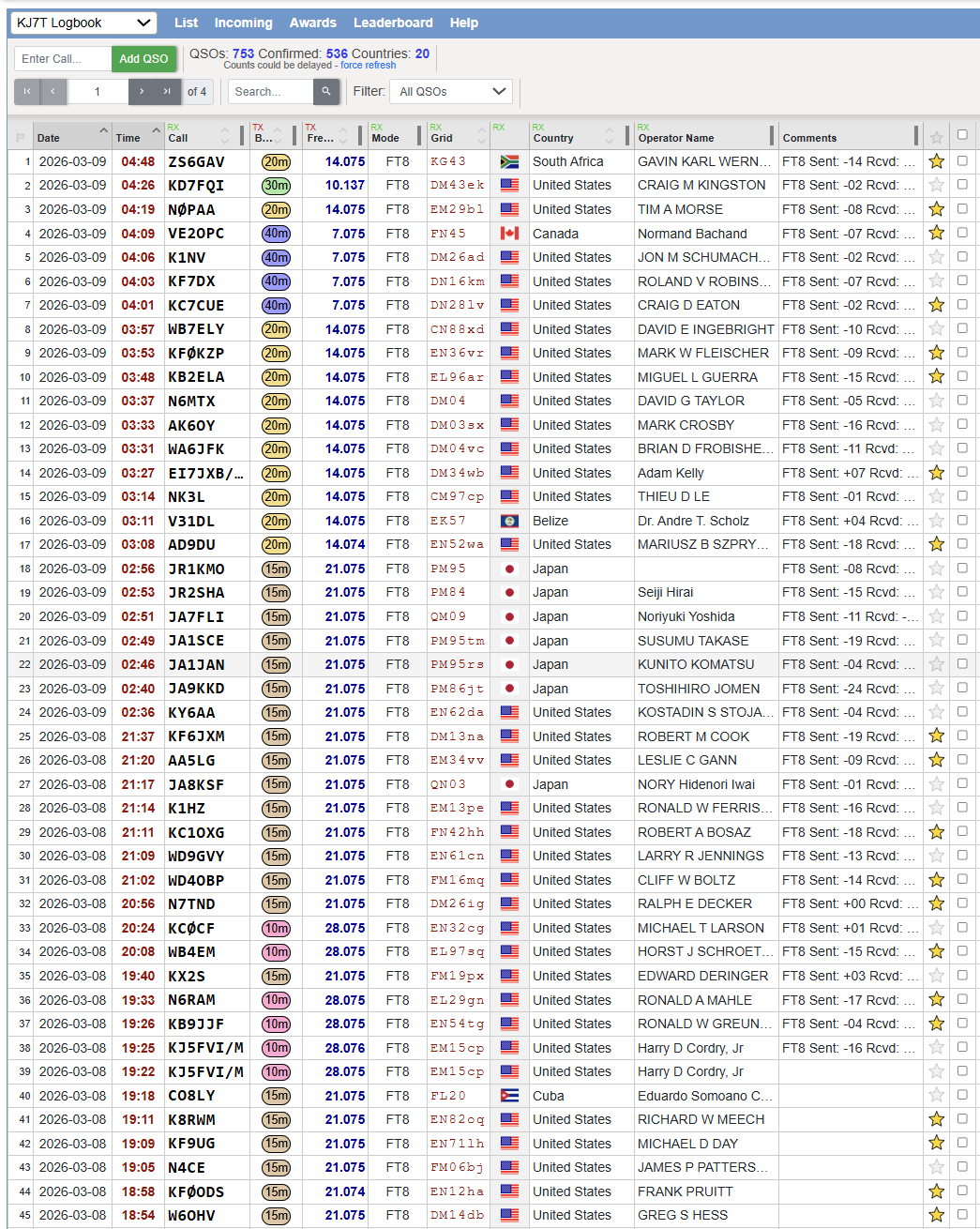
On Sunday, I spent some time working FT8 stations on 10, 15, 20, 30, and 40 meters. I picked up two new countries: Belize and South Africa. I guess the system is working! (The yellow star in the right column means the contact is confirmed.)
Now to figure out how to switch the radio to phone (phone means voice for those unfamiliar with amateur radio lingo) so I can try to participate in Tuesday night’s 10 meter net! It turns out this was easy: press USB-D [D for data] on the touchscreen, select SSB, and the radio switched out of data mode to USB [upper side band] on 10 meters. I was stumped for a few minutes because I had forgotten this new radio actually has a touchscreen. Clearly, I’m not used to this newer technology!
I also learned something new about FT8. I use it to help identify which directions my antenna are strong, and where it is less strong. Looking at locations of stations I contact, I learn more geography. But the new thing I learned is: I can play radio without disturbing my wife while she watches a movie or rests. FT8 is a great activity for people who can’t make unwelcome radio noise in their environment.
Another HamClock? Try HamDash!
I ran across another version of a HamClock. This one is an app served over the web and it is chock full of information of interest to amateur radio operators.
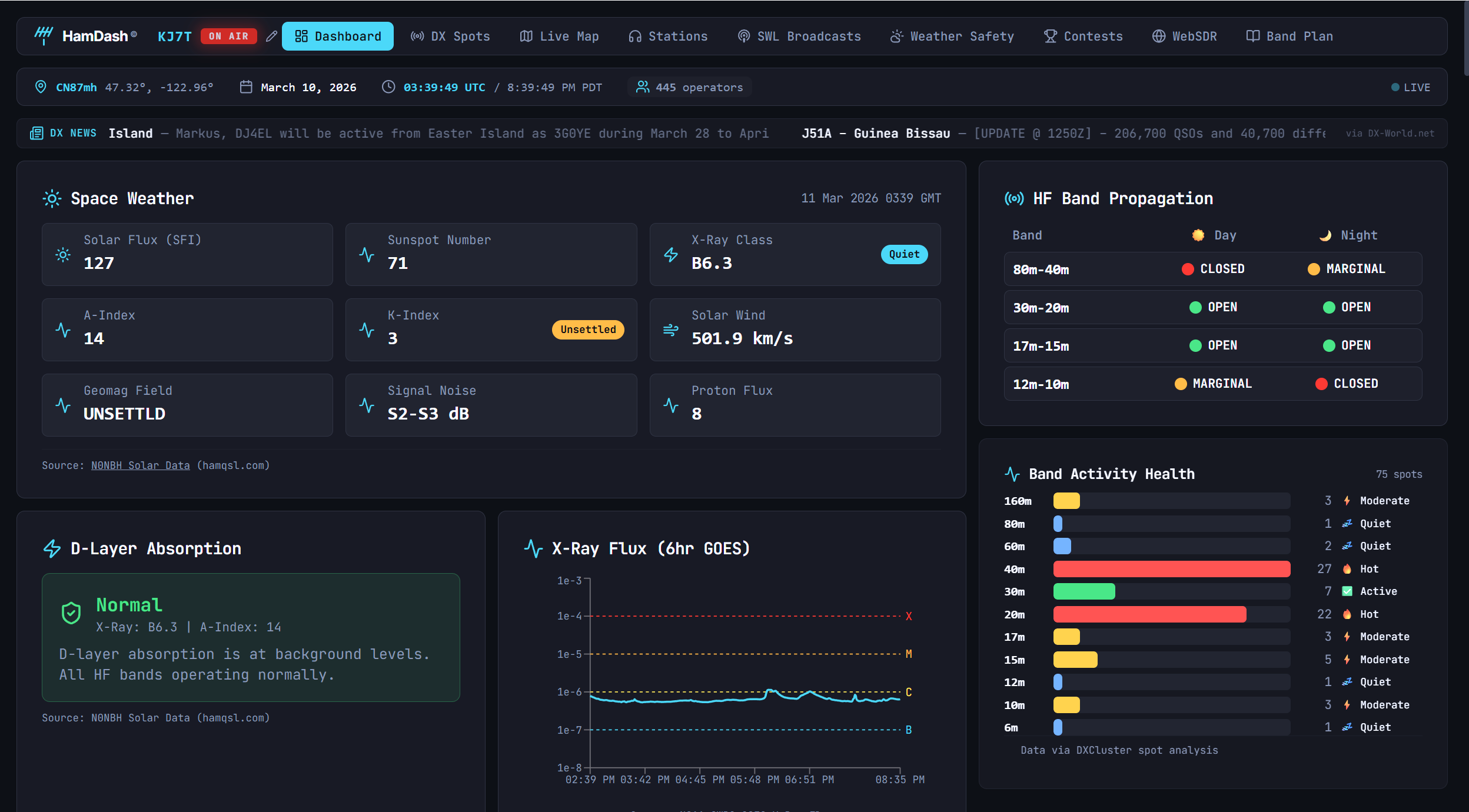
There are several screens available via horizontal tabs across the top of the app window. You’ve got one-click access to the band plan for the United States, WebSDR, contests, weather and safety info (if you allow it to know your location), shortwave stations, amateur radio stations, a live map, and DX spots. Be sure to scroll down because on some tabs, there is a lot more information provided below the fold.
Truly, there is a lot of content provided. Find it at https://hamdash.app/.
Changed My VPN Provider
I have been using NordVPN for several years. NordVPN has almost always worked perfectly for me on my computers and phones. I have no complaints. Well, no complaints until the renewal price showed up in my email: $149.88 for a year of service. Ouch.
So I went shopping. I looked at a few larger providers like Mullvad (cheaper than NordVPN, good reputation, but didn’t work well for me a few years ago when I tried it) and SurfShark (probably the budget choice here). The service I settled on was ProtonVPN as part of a package that includes the ProtonMail account I already have. Price: $119.88 for a year of the Proton Unlimited plan (monthly plan also available). This package includes:
500 GB storage
1 user
15 extra email addresses
Support for 3 custom email domains
Unlimited folders and labels
Unlimited hide-my-email aliases
Dedicated customer support
Ultra fast and private VPN
Encrypted password manager
Encrypted cloud storage for photos and documents
Advanced account protection
For me, the custom email domains may come in handy as EtherHam continues to expand and if my new publishing LLC grows legs.
I signed up and installed ProtonMail and ProtonVPN on my laptop. And then I ran into a wall: ProtonVPN blocked access to some of my work and hobby sites. My first thought was: I made a mistake in selecting ProtonVPN. The solution, according to various help articles, was to implement “split tunneling.” This is a way to bypass the restrictions enforced by VPN. I tried that by specifying one browser application as excluded from the VPN.
Split tunneling worked perfectly, until it didn’t. All was well until the next morning when suddenly, I couldn’t connect to anything through the browser I had excluded from the VPN. That was a problem because through that browser, I access my GMail, maintain websites, and write this newsletter.
Somewhere in the NordVPN instructions it must explain the solution, but I didn’t find it there. Instead, ClaudeAI helped me figure this out. When using split tunneling in ProtonVPN, you must start the VPN before you open the browser. If you already have the browser open (as I did) before ProtonVPN starts, it will include the browser in the encrypted VPN tunnel it creates.
So I closed my browser, restarted the VPN, and then opened my browser. That worked perfectly. Now I just need to make this a habit and all will be well. Does this apply to other VPNs? It didn’t work that way with NordVPN, so I don’t know if this is usual or unusual.
If you’d like to try Proton, please consider using my affiliate link: https://pr.tn/ref/163BX2DJ
Short Stack
LinHT-hw: Open-source, Linux-based, SDR handheld transceiver — If you are into open source and amateur radio, this project will be very interesting. Get more information in last week’s Zero Retries. LinHT is an open-source handheld software-defined radio (SDR) transceiver built around a modern Linux System-on-Module and a true IQ RF front-end.
True SDR: IQ baseband access, not FM-only
Linux-first: no microcontroller firmware lock-in
No FPGA: easier development, lower entry barrier
Open everything: hardware, software, toolchains
Hackable handheld: not just another black box walkie-talkie
Revolutionize Your POTA Experience with Potacat Software — Potacat was specifically developed to streamline the workflow for POTA operators, helping them effectively log contacts, track park activations, and maintain organization while operating in various environments. By focusing on the needs of portable ham radio enthusiasts, Potacat offers a user-friendly interface that simplifies the logging process.
HRWB 258 - Morse Code Bug Emulator with Don WB9CYY and Bob WO6W — In this episode we meet Don WB9CYY and Bob WO6W. Both avid CW operators with a love of the old style mechanical "bug" radio telegraph keys. Feeling that the existing CW paddles and keyers sent code that was too highly accurate and lacked any sort of personality, they came up with a very novel way make a modern paddle sound like a bug.
Digitenna Review: The Ultimate Portable HF Antenna — The Digitenna multi-band portable antenna by DigiRig offers amateur radio operators a practical solution for field operations, POTA, SOTA, and emergency communications. This compact HF antenna is designed for those seeking reliable performance across multiple bands, including 10m, 15m, 20m, and 40m.
This tiny radio lets me send texts without Wi-Fi or cell service — Do you ever wish you had a way to message people long-distance without the need for cell networks or a Wi-Fi connection, or even satellites? You're going to want to hear about a tiny, cheap radio I bought and connected to my smartphone.
The Best USB Microphones for Musicians and Podcasters — I could have used this information when I was experimenting with microphones! I just ordered this well-reviewed dynamic mic and will let you know how it performs: MAONO PD200W Hybrid Wireless Podcast Microphone for PC, Dynamic XLR USB Mic with Desktop Stand, Software, Noise Cancellation, for Vocal Recording, Streaming, Content Creation, Home Studio, Voiceover (affiliate link)
Ham Radio Portable Insights: POTA QRP Fun — Operating QRP can be more of a challenge during rough band conditions, but it’s a breeze during good conditions. The easiest way to get started in QRP is to use the equipment you already own and just reduce the power level. Most HF transceivers produced in the last 50 years have the means to reduce the power to QRP levels.
You too can build this awesome ISS tracker with a Raspberry Pi — Over on the Raspberry Pi subreddit, user fil1983 made a thread to show off their ISS tracker. It combines a 3D-printed shell, a screen, a Raspberry Pi 3b, and an API to track the space station's location to create something that'd look good on anyone's shelf.
Signing Off
As I write this, the Pacific Northwest, USA, is getting hit with an atmospheric river. I’m in the sun room with four skylights overhead and the big, fat raindrops (some of them coming off the tall Douglas fir tree beside the house) striking them makes quite the racket during big storms. This isn’t a PNW drizzle: it’s a steady, heavy rain.
This event will dump a lot of snow in the mountains. We desperately need that snow for summer irrigation of farms and orchards, but all too often, these end-of-winter snows melt quickly in the spring. The pattern I’ve seen for years is a late winter deluge followed by a significant warm-up period where most of the new snow melts off. I hope that is not the case this time. In western Washington and Oregon, the National Weather Service has issued flood warnings in several areas. (By the way, the new HamDash app will show those warnings to you in your area under the Weather and Safety tab.)
Spring is springing. Daffodils are blooming and the branches of willows and maples and dogwoods are getting brighter as the spring sap begins to flow. I can see buds about the size of my thumbnail on the native Dogwood tree outside the window. I do enjoy watching winter retire and new life burst forth as spring wakes up.
What I’m saying is there is much in my life to appreciate, even if my shoes are often soggy from the rain!
Among the things I appreciate are my amateur radio friends. Two such friends are in the forefront of my mind this week: Steve Stroh N8GNJ and Tina Stroh KD7WSF. They have finally overcome most of the challenges they faced in transitioning the Zero Retries newsletter to their new address and service: https://www.zeroretries.radio/. If you haven’t subscribed to the Zero Retries newsletter, you’re missing content that is always on the cutting edge of what is happening in the digital radio realm. Zero Retries is Random Wire Recommended.

It was not a clear, easy road for them. Steve and Tina are the “Energizer bunnies” in my ham radio universe, constantly unearthing great content for the Zero Retries newsletter. They are also preparing to deliver their second annual Zero Retries Digital Conference. Along the way, they have been extremely supportive as I traveled my own bumpy road. I appreciate them very much.
Similarly, the radio amateurs I talk with almost daily are great people, always ready to lend a helping hand. When I mentioned having some trouble with my antenna on 10 meters, one of them said: I have an extra antenna, come get it. I hope we can find ways to keep the ham spirit alive as new generations of people join our very large family of licensed amateurs.
Like any family, there are a few members we may like a little less, but for the most part, our community is an amazing body of people who care about each other. We don’t talk about it much, but I see it every time something goes wrong in a big way…and sometimes in the little things people do for each other. I like being a part of this community. I hope you do, too.
73 to all, and remember to touch a radio every day!

What is an M17 reflector?
M17 is an open-source digital radio protocol designed as a modern, free alternative to proprietary systems like DMR or D-STAR. A reflector in this context is a server that links multiple M17 stations or hotspots together, allowing radio operators around the world to communicate in real time.
How it works
Individual operators connect their radios or hotspots (small personal repeaters) to a reflector over the internet
Anyone connected to the same reflector can hear and talk to each other
Reflectors are identified by a name like M17-USA or M17-GBR, with a module letter (A, B, C, etc.) to subdivide traffic
Why M17?
Fully open source — no licensing fees or proprietary codecs
Uses the Codec 2 voice codec (also open source)
Designed for modern use cases including data transmission, GPS position reporting, and voice
Gaining popularity as hams look for alternatives to closed digital systems
An end-fed half-wave (EFHW) antenna is a wire antenna cut to a half-wavelength (or multiple thereof) at the desired operating frequency, fed at one end rather than at the center as with a traditional dipole. Because a half-wave antenna presents a very high impedance at its end — typically 2,000 to 5,000 ohms — a matching transformer is used to step that impedance down to the 50 ohms expected by most transceivers and coaxial feedlines. One of the EFHW's greatest practical advantages is that the coax feedline and radio can be located at one end of the antenna rather than at its center. This makes it much easier to deploy in situations where a center-fed arrangement would be inconvenient — such as when attaching one end to a building, running the wire up a single support, or operating portable in the field.
My Friday mornings start with a cup of coffee, and Random Wire. Just enough reading a quick look at some of the more in-depth reading material. Just enough to “set the hook”. 😃. Then it is a race to get through my work day so that I can come back to it and really get into the depth of some of the articles. I’m a new ham, but a lifelong techie. And Random Wire really hits the spot with me!