
00 Welcome
It’s been another interesting week of working with Python and Claude. There’s a long piece on this at EtherHam.com titled Coding with Claude that describes two apps: the Lab Tracker and HF Watch. The Lab Tracker is a simple interface to keep track of the different machines on my network. HF Watch looks at amateur radio usage by band and time of day. Visit Coding with Claude: Lab Tracker and HF Watch for more.
Also new at EtherHam this week:
TechNote 15 — Upgrading the Digital Radio News Gatherer with Groq AI
TechNote 16 — A Practical Backup System for Vibe-Coded Projects on the Raspberry Pi 5
My CDN (content delivery network) has been having some trouble this week. A few EtherHam visitors have let me know that images were missing. The service provider is trying something to see if it will help with this, so if you have a moment, please jump over to EtherHam.com, browse a few articles, then let me know if images are missing or not loaded. Thank you.
PoC radios (push-to-talk over cellular) for amateurs will be the focus of the weekly Let’s Talk Digital net on America’s Kansas City Wide network next week. That will be Thursday evening, April 23, at 8 pm Central (6 pm Pacific). If you’re curious about PoC radios for hams, the Thursday net promises to be incredibly informative.
I did get a few evenings on the HF bands. Wednesday, I made a trip to Portland and drove through five little storm cells where the temperature dropped quickly and snow started sticking to the pavement and windshield. Translation: it’s a fairly normal spring in the Pacific Northwest — warm and sunny, cold and stormy, rinse and repeat.

01 WSJT-X 3.0 Upgrade Is Significant
Last week, a significant upgrade to WSJT-X was released.
Here’s a rundown of what changed from WSJT-X 2.x to 3.0, released April 8, 2026. (Find WSJT-X on SourceForge.) When you upgrade, it’s good practice to back up your WSJT-X.ini and log — your settings should migrate (mine did), but better safe than sorry.
The first thing you’ll notice is the user interface is crisper, more modern:
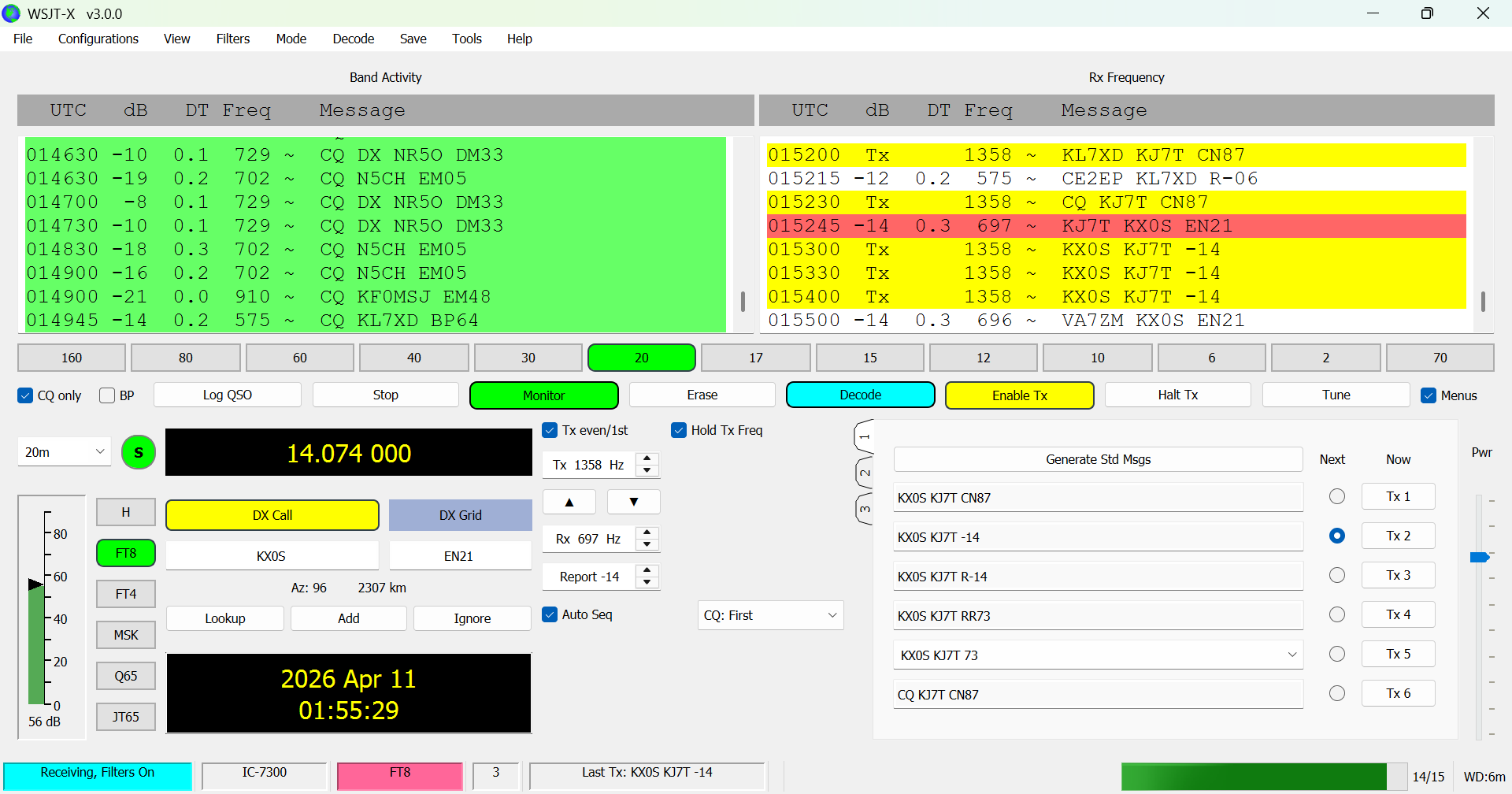
Also notice the blue-color box in the lower left corner that says “Receiving, Filters On.” More on filters in a moment.
What WSJT-X 3.0 is, architecturally
The jump from 2.7.0 to 3.0 reflects a genuine architectural step forward, consolidating features that had been circulating in the unofficial “Improved” branch and adding new ones that go well beyond cosmetic changes. If you were already running WSJT-X Improved by DG2YCB, much of this will look familiar. According to the WSJT-X 3.0 User Guide, the feature sets of WSJT-X and WSJT-X Improved have been merged, bringing the two programs into alignment.
Key Changes
Parallel FT8 Decoding — FT8 decoding now runs up to a dozen concurrent threads. On a modern multi-core machine, the practical effect is a faster and more complete decode list at the end of each 15-second period — particularly useful on busy DX frequencies where marginal signals compete for decode slots.
Full Duplex Operation — WSJT-X can now transmit and receive simultaneously, opening a legitimate path for satellite work where the audio source is the transponder downlink, and for monitoring your own transmitted signal via a WebSDR as the audio input. Until now, this required external workarounds or separate software.
Advanced Filtering System — The new filter system lets you suppress, highlight, or hide stations already worked on the current band, worked today, or worked yesterday — all configurable from File | Settings | Filters. The Filters menu lets you toggle categories on the fly during a session. For example, if you only want to see CQ calls from POTA stations, there’s a filter for that.
Smart Sequencing for All Modes — Wait and Reply, Wait and Call, and Wait and Pounce — previously available only in FT8 — now apply to all WSJT-X QSO modes, including JT4, JT9, JT65, FST4, FT4, MSK144, and Q65.
SWR/Power Monitoring and TX Protection — Transmission can be stopped automatically if reported SWR exceeds a configurable threshold (e.g., 2.5), depending on rig support via Hamlib or FLRig. Transmit power is displayed in real-time and works with most modern rigs.
EME Enhancements — EME operators get quick-access buttons for Echo mode and six popular Q65 sub-modes, easier dial frequency selection within EME sub-bands, and experimental decoding of sub-modes 15A, 15B, and 15C with EME delay.
Single-Click Band Buttons — Single-click band buttons can be enabled from the View menu for faster band switching.
Audible Alerts — Customizable sound alerts for specific message content are now built in.
TCI Support — Enhanced rig control and audio routing via the Transceiver Control Interface (TCI) is now included.
SuperFox / SuperHound Improvements — SuperHound operators can now activate Wait and Call for SuperFox callsigns, with warnings for frequency conflicts.
Advantages for the Modern Ham
For a DXer, the parallel decoding and advanced filters are the big wins — you’ll pull more call signs out of a pileup and spend less time visually parsing signals you’ve already worked. For satellite ops, full duplex is transformative, eliminating the need for separate software or audio routing workarounds. The SWR halt is a great safety feature if you run barefoot or switch antennas mid-session. And the unification of the Improved branch means you no longer need to choose between the official version and the community fork — you get the best of both in a stable, supported release.
02 Notable: Jim N1ADJ’s M17 Go Tools Project
A quietly ambitious project has been taking shape on GitHub. Jim N1ADJ’s M17 Go tools repository (github.com/jancona/m17) started as a messaging experiment and has grown into a multi-tool platform that hints at where M17 data communications could be headed.
I’m talking about m17-bridge, an experimental network service that bridges M17 SMS messages to and from Discord, IRC, and APRS-IS. It connects to hotspots and repeaters using the standard M17 internet protocol — meaning it looks just like a reflector to any compatible device. The clever part is how it uses M17’s familiar module letter system as a routing mechanism: instead of selecting Module A to reach one group of users and Module B to reach another, you’re selecting which external messaging platform your SMS traffic crosses into. Module A might bridge to a Discord channel, Module B to an IRC server, Module C to APRS-IS. From the radio operator’s perspective, it’s the same connect-and-talk experience you already know — but the destination is now a messaging platform that non-ham users access. When a GNSS-equipped radio sends position data, the bridge automatically forwards periodic position reports to APRS-IS as well.
Alongside the bridge, the project includes m17-gateway, which supports three hardware platforms (CC1200 Pi HAT, SX1255 Pi HAT, and MMDVM-compatible modems) and can function as either a hotspot or a full M17 repeater. It ships with full M17 feature support including voice, SMS, and GNSS position mapping. A companion GUI messaging client — cross-platform, built on the Fyne framework — rounds out the toolkit and suggests Jim has everyday usability in mind, not just developer experimentation.
What’s worth watching here is the project’s trajectory. M17’s packet mode has largely been underutilized — most operators think of M17 as a voice mode. This project is a serious attempt to change that, and the APRS integration in particular could give M17 text messaging a reach far beyond the M17 community itself. If m17-bridge matures and a public example node comes online as planned, it could become a model for how open digital radio modes integrate with the broader internet messaging ecosystem.
It is early days — but this project is worth keeping an eye on.
03 M17 Data Modes: The Sleeping Giant Wakes
Most M17 operators think of the protocol as a voice mode — and understandably so, since that’s where almost all the activity has been since 2019. But M17 was designed from the start to be a data protocol, too, and 2025-2026 is shaping up as the period when that side of the protocol gets some serious attention.
The spec’s reserved packet mode types tell the story: RAW, AX.25, APRS, 6LoWPAN, IPv4, SMS, and Winlink are all defined. What’s been missing isn’t the protocol foundation — it’s the tools, the experiments, and the community focus. That’s beginning to change.
The most concrete sign of progress is Jim N1ADJ’s m17-bridge, covered above. Bridging M17 SMS traffic to Discord, IRC, and APRS-IS is a real data mode application, running on real hardware, today. It’s a preview of what becomes possible when developers start giving M17’s packet mode the attention it deserves.
Further out, the IPv4 story is intriguing but still unfinished. M17 has native IP framing built into the spec and a protocol identifier for IPv4, but how to actually implement IP over M17 seems underspecified, making this is open territory for an ambitious developer. Meanwhile, the Open Research Institute selected M17 as the uplink protocol for their P4DX satellite transponder project, a serious technical endorsement that points toward M17 data modes eventually operating in space as well as on the ground.
None of this would be moving forward as confidently without a significant inflection point from mid-2025. In July of that year, the MMDVM project dropped M17 support, a decision that quickly affected Pi-Star and WPSD — the hotspot software platforms that tens of thousands of operators use. For M17 users running MMDVM-equipped hotspots, it looked like the rug had been pulled.
The M17 Foundation's response was immediate: fork the last WPSD codebase that still included M17 support and make it available to the community. WPSD-M17 is that fork — not actively developed, but preserved and functional, giving operators running MMDVM hotspots time to absorb the change without losing access to M17 overnight. More importantly, it bought the broader community breathing room to figure out what comes next. The answer, increasingly, is native M17 hardware and software that doesn't depend on MMDVM at all, as well as increasing support for MMDVM hardware.
In hindsight, what looked like a setback in July 2025 turns out to have been a catalyst. The M17 Project is building for independence and the data mode story is a big part of what that independence will enable.
I asked Steve Stroh N8GNJ of Zero Retries to look this piece over and he suggested these valuable additions which I am including verbatim below:
Potentially, M17 has the best support for “file transfer” data of any of the Amateur Radio DV modes.
DMR has support for data, but it’s not specified with enough detail to enforce or incentivize data compatibility. The data implementation by Motorola and Hytera, for example, are usable, but only within those radio families - the Hytera data app cannot send data to a Motorola DMR radio, and vice versa.
P25 has very similar “support” for data as DMR.
D-Star supports data, but only as a stream with no packet framing. In addition, late in the life of D-Star, Icom supported DV Fast Data which allows the 3600 bps digital voice payload to also be used for data, but it’s supported only on the most recent D-Star radios.
System Fusion only supports data for transferring images; use for any other type of data transfer is blocked.
Support for short messaging and position data and “APRS-like” short data vary widely in DMR, P25, D-Star, and SF.
Because M17 didn’t have a profit motive guiding its development (soak the customer when they want to use data on their very expensive digital voice radios), they embraced and adapted the well-proven data technology of packet radio.
M17 may well be the first “digital agnostic” (digital voice / messaging / position / block data) DEFAULT mode to be implemented in the new generation of Software Defined Radios that will debut with the LinHT, and I posit that the “LinMobile” will follow shortly thereafter.
Many thanks to Steve for strengthening this piece about M17. What an exciting time to be involved in this evolution of digital amateur radio!
04 Revision to the Digital Radio News Gatherer
My Digital Radio News Gatherer (more here and here) was taking 10 minutes or more to process 100 information sources on the Raspberry Pi 5. I asked Claude: how can we improve the performance? The answer? Offload the processing to Groq.
Gatherer version 2 now takes about 15 seconds to do what Ollama was doing on the Raspberry Pi 5 in 10 minutes. That is amazing.
While I was in tinkering, I also tightened up the prompts to help reduce the amount of AI hallucination in the generated summary. I also made sure I understand how to add additional news sources (and did add more sources).
Interested? Read about the upgrade at EtherHam.com.
05 Coding with Claude
I’ve been enjoying getting a helping hand from Claude. Most recently, I asked Claude to build a tracking system for my home lab machines. It looks simple, and it actually is simple…but it is also useful for me.
If you would like to dive into more detail, see the Coding with Claude article on EtherHam.com. If you looked at Coding with Claude early this week, that article grew bigger over the course of the week!
The Lab Tracker
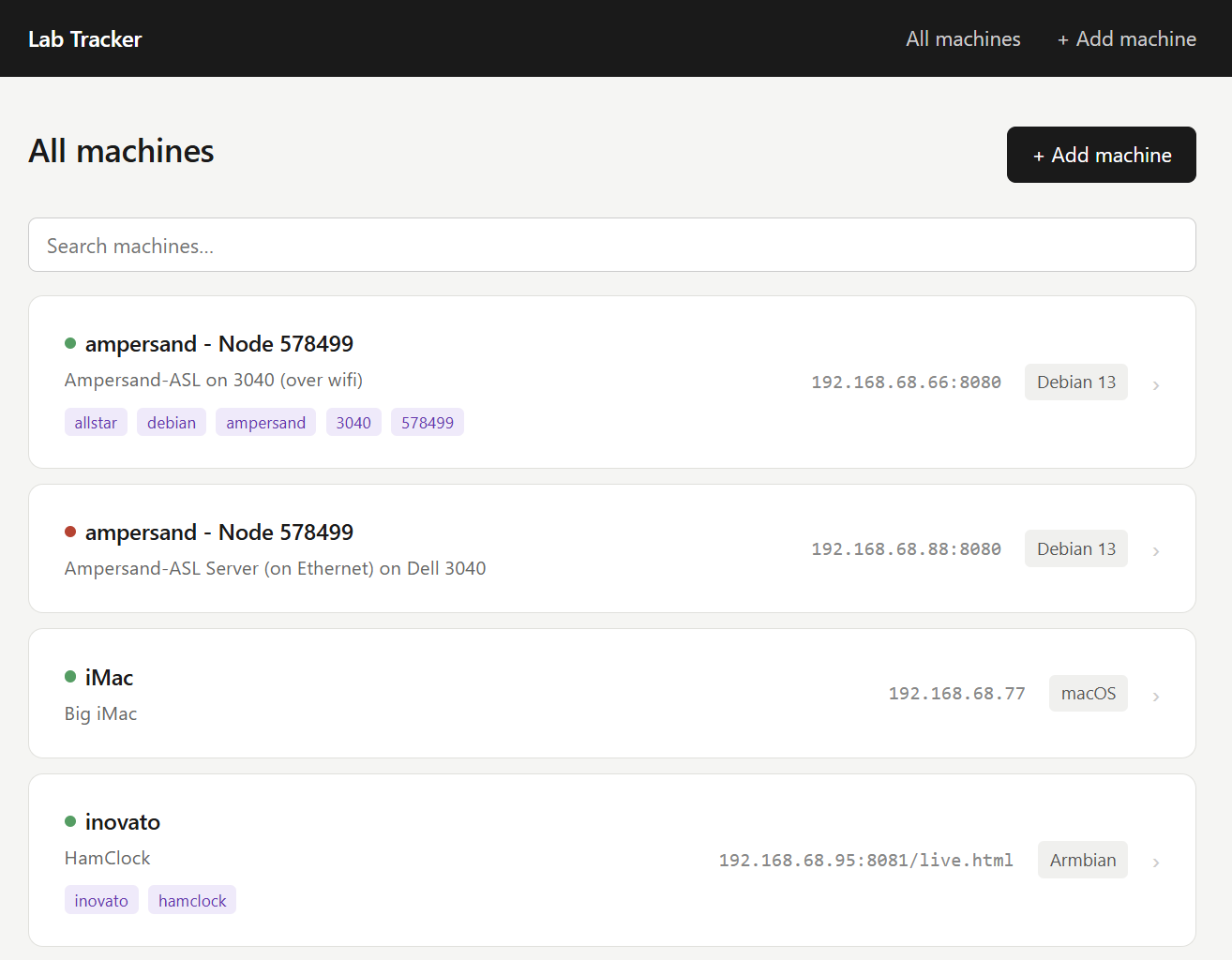
The Lab Tracker uses Python and SQLite on a Raspberry Pi 5. It’s got machine names, descriptions, IP/URL, username, types of access, tags, notes (an informal change log), and a bit more. The search box is a live search with some JavaScript magic.
Claude documented a summary of the system, which is probably enough if you want to ask Claude to build something like this for you. I’ve posted the summary over at EtherHam.com.
HF Watch
In the wee hours of the morning last Sunday, I thought of an app I’d like to have available. A cursory search suggested it did not exist (but if you know of a service or system like what I’m about to describe, please do let me know).
I had a 30-minute session with Claude at 3:00 am to develop what I call HF Watch. Every 15 minutes, it pulls the number of contacts in my Maidenhead grid square for each amateur radio band. The source of the data is PSKReporter, using their published API.
By Thursday afternoon, HF Watch had pulled nearly two million points:
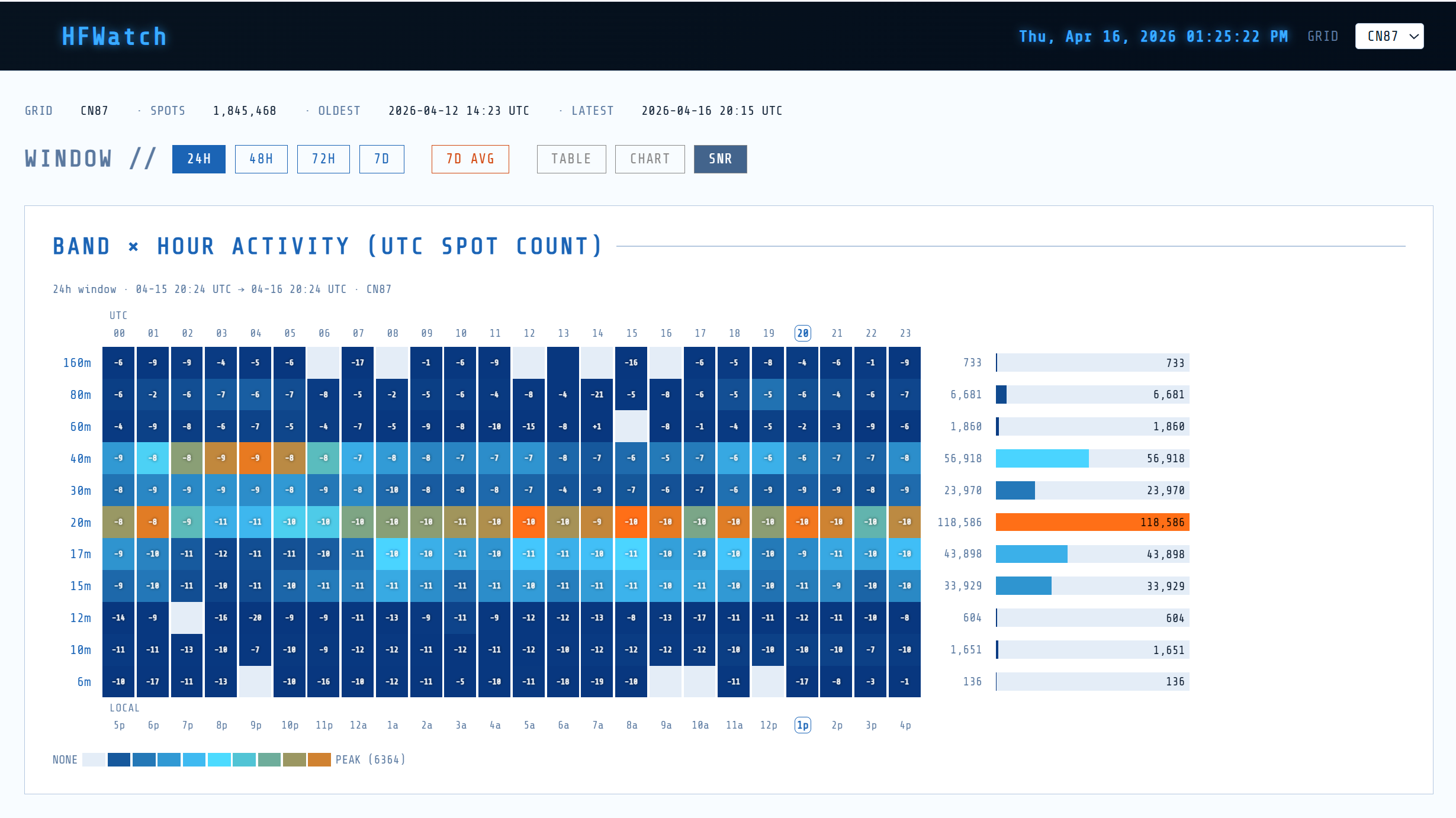
What does this mean? HF Watch shows when each band was most and least active. That is significant information, but it gets more interesting when I set a DX grid square to see when amateurs in a distant location are active, and on what bands. This is the kind of information that can help me schedule when to try to get some of those elusive DX contacts.
I also incorporated signal-to-noise values because knowing the signal quality is just as important as knowing when the most stations are active.
I’ve added information about HF Watch to the Coding With Claude piece at EtherHam.
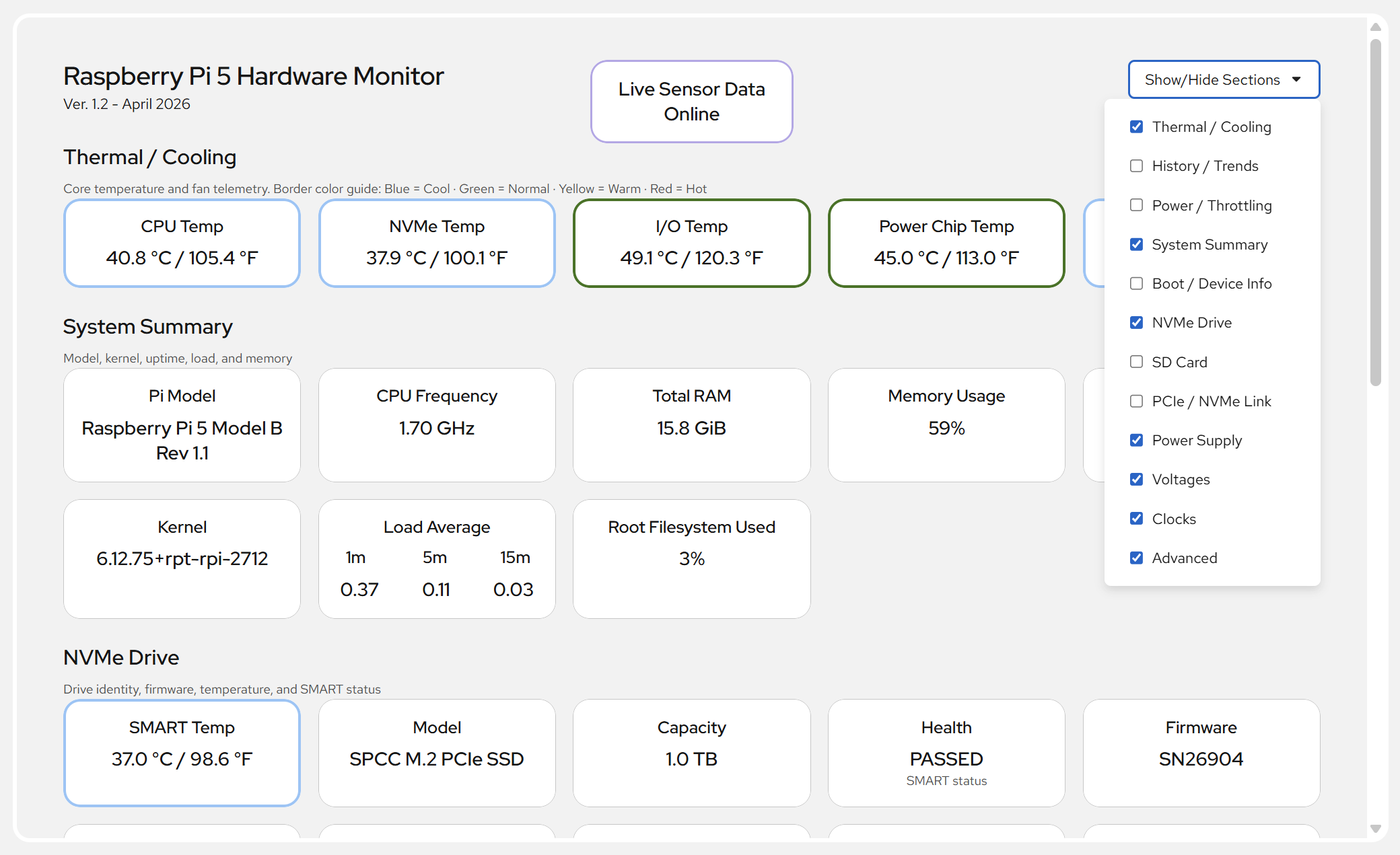
I also installed Cockpit on the Raspberry Pi 5 and added the Pi 5 Hardware Monitor package from GitHub. This has been a helpful addition, allowing me to easily monitor loads and temperatures.
06 SDR Follow-Up
My RTL-SDR v4 dongle is being difficult. I can’t get Zadig to see it, which means my Windows 11 machine isn’t seeing it. I’ve moved it to different USB ports, I’ve uninstalled the driver and started over, and it’s just being darned difficult.
So I pulled my whimsical little SDR dongle out of the package and plugged it in, in place of the RTL-SDR. I wasn’t expecting much, but Zadig found it immediately. I installed the driver, then ran rtl_test.exe. The Windows system not only sees it but is reading data.
Then I started rtl_tcp.exe on the host machine:
rtl_tcp.exe -a 0.0.0.0Finally, I opened SDR++ on my laptop in another room. I selected RTL-TCP as the device type, entered the IP address of the host machine, then tuned to 98.1 FM (KING-FM Classical)…and enjoyed a couple of hours of wonderfully clear music.
The audio stream is booming in. Radios at the lake house typically barely pick up KING-FM so I am delighted with this outcome. I’m pretty impressed with this little dongle and you can’t beat the price ($38.95).
NESDR Nano 2 Plus - Tiny Black RTL-SDR USB Set (RTL2832U & R820T2) with Ultra-Low Phase Noise 0.5PPM TCXO, MCX Antenna (affiliate link)
For recreational listening, this is a great value. The other aspect of this small dongle is it doesn’t put much stress on the computer’s USB port, compared to the longer, heavier RTL-SDR.
Speaking of SDR, this project sounds very interesting: BrowSDR: Turn Your HackRF or RTL-SDR Into a Browser-Based Remote WebSDR.
The real killer feature is remote access. Using WebRTC, you can share your locally connected SDR and access it from anywhere in the world through a browser with no server setup required.
07 Short Stack of Interesting Finds
Digital Radio
You Mean There’s More to Digital Modes than Making Contacts on FT8? — “Today I’m going to discuss some different digital modes that serve a deeper purpose than making contacts. We’ll look at ways to pass messages, forms, and other data back and forth beyond simply a signal report.”
Antennas
Build Your Own Linked PackTenna EFHW: A Complete Guide — “The linked PackTenna design allows for multiple configurations, enabling users to operate on different bands without needing separate antennas. By using a simple four-link system, you can create antennas ranging from 10 to 40 meters.”
AI
After two months of Open WebUI updates, I’d pick it over ChatGPT’s interface for local LLMs — Of interest to me because I’m running Open WebUI on my Raspberry Pi 5! It’s slow on the Pi, but it’s local and costs me nothing but electricity.
Working around Claude’s strict limits taught me how to use it properly — “Some of the frustration lies in how these limits work. While some tools base your usage quota on your queries, your usage limit in Claude is not just based on how many messages you send. The number of messages you send plays a role, but so do the size of your attached files, the current conversation length, which tools Claude is using (such as web search), which model you're using, and whether Claude is creating artifacts.”
Computing / Linux / Raspberry Pi
PocketTerm35 – A Raspberry Pi 4/5-based handheld Linux terminal with 3.5-inch touch display and built-in keyboard — Included because who doesn’t like an interesting gadget?
10 Ways to Reuse Old Hardware with Raspberry Pi — “A Raspberry Pi is perfect for giving old hardware a second life. With the right setup, it can turn almost anything into a useful device, from a simple monitor to a full home server. It’s a practical way to reuse spare equipment.”
What is NextDNS? — This caught my eye because I use NextDNS. “Think of NextDNS as a “Firewall in the Cloud.” It provides the same ad-blocking and tracking protection as a Pi-hole, but instead of running on a Raspberry Pi in your living room, it runs on a global network of high-performance servers.”
08📋Digital Radio Digest
My Digital Radio News Gatherer (DRNG) bot did not find much of interest this week, and some of the information is not entirely fresh. Some items are clearly misclassified, so don’t get too wound up if you see information about a mode in the wrong place.
I’ve added a download button so you can see the raw news sources I gathered, if you are so inclined. DRNG was run 2026-04-16 17:57 UTC
Executive Summary
Recent developments in amateur radio digital voice and VoIP linking modes include updates to M17, with the M17 Gateway now supporting three hardware platforms, including the SX1255 HAT. The M17 project has also seen updates to its C++ library, specification, and tools. Additionally, there have been updates to the OpenRTX firmware, including support for vibration motors and changes to audio processing. The DMR mode has seen updates to the MMDVM Host software, primarily focused on fixes for D-Star logging.
Per-Mode Breakdown
DMR
The DMR mode has seen updates to the MMDVM Host software, with a recent commit (2026-04-16) focused on fixes for D-Star logging. Another commit (2026-04-07) updated the documentation to reflect the current state of the software.
D-STAR
There is no recent information available for the D-STAR mode.
YSF/C4FM/WiRES-X
The YSF/C4FM/WiRES-X mode has seen updates, including the release of WiRES-X 2.0, which was discussed in a Random Wire article. HamOperator has also published articles on customizing WiRES-X and solving ISP connection problems. Additionally, a WXScheduler project is available for WiRES-X.
M17
The M17 mode has seen significant updates, including the M17 Gateway now supporting three hardware platforms, including the SX1255 HAT. The M17 project has also seen updates to its C++ library, specification, and tools. The gr-m17 repository has seen updates, including improved Codec 2 blocks. The OpenRTX firmware has also been updated with changes relevant to M17, including support for vibration motors and changes to audio processing.
VoIP Linking
There is no recent information available for the VoIP Linking mode.
Notable Firmware or Software Updates
M17 Gateway (Go): updated to support three hardware platforms, including the SX1255 HAT
M17 C++ library: updated to match libm17 1.1.8
OpenRTX firmware: updated with support for vibration motors and changes to audio processing
MMDVM Host: updated with fixes for D-Star logging and documentation updates
Cross-Mode Developments
There are no notable cross-mode developments in the collected items.
09📡 Band Conditions This Week
Solar Flux Index (SFI): 141.0 — Good — solid conditions on 10m through 20m
K-Index (current): 1.0 — Quiet — excellent conditions
K-Index (7-day max): 4.3 — Minor storm — HF disruption likely
A-Index: 15 — Unsettled (predicted)
Sunspot Number: 85
Active Solar Regions: 5
Solar flux holding at 141 gives the higher HF bands a real boost right now, so if you haven’t spent time on 10, 12, or 15 meters lately, this is a good week to remedy that — DX contacts and long-haul paths should be quite productive while the K-index sits at a quiet 1.
That said, the week wasn’t entirely smooth sailing; the 7-day max Kp touched 4.3, meaning there were some unsettled stretches that likely rattled the higher bands and pushed aurora-sensitive paths around, so if your logbook looks thin from a few days ago, that’s probably why.
With the predicted A-index still running at 15, a little residual unsettledness may linger, but today’s conditions are about as good as it gets for chasing DX.
Source: NOAA Space Weather Prediction Center (swpc.noaa.gov)
Generated: 2026-04-16 17:54 UTC
10 📻 This Week in Radio History
Notable events from April 13 through April 17, across the years.
1912 — Wireless in the Dark
In the early hours of April 15, 1912, the sinking of the RMS Titanic unfolded in the North Atlantic Ocean.
Aboard the ship, wireless operators Jack Phillips and Harold Bride tapped out distress calls — first CQD, then the newer SOS — as the scale of the disaster became clear. Those signals were picked up by the RMS Carpathia, which turned and ran hard through the night, ultimately rescuing more than 700 survivors.
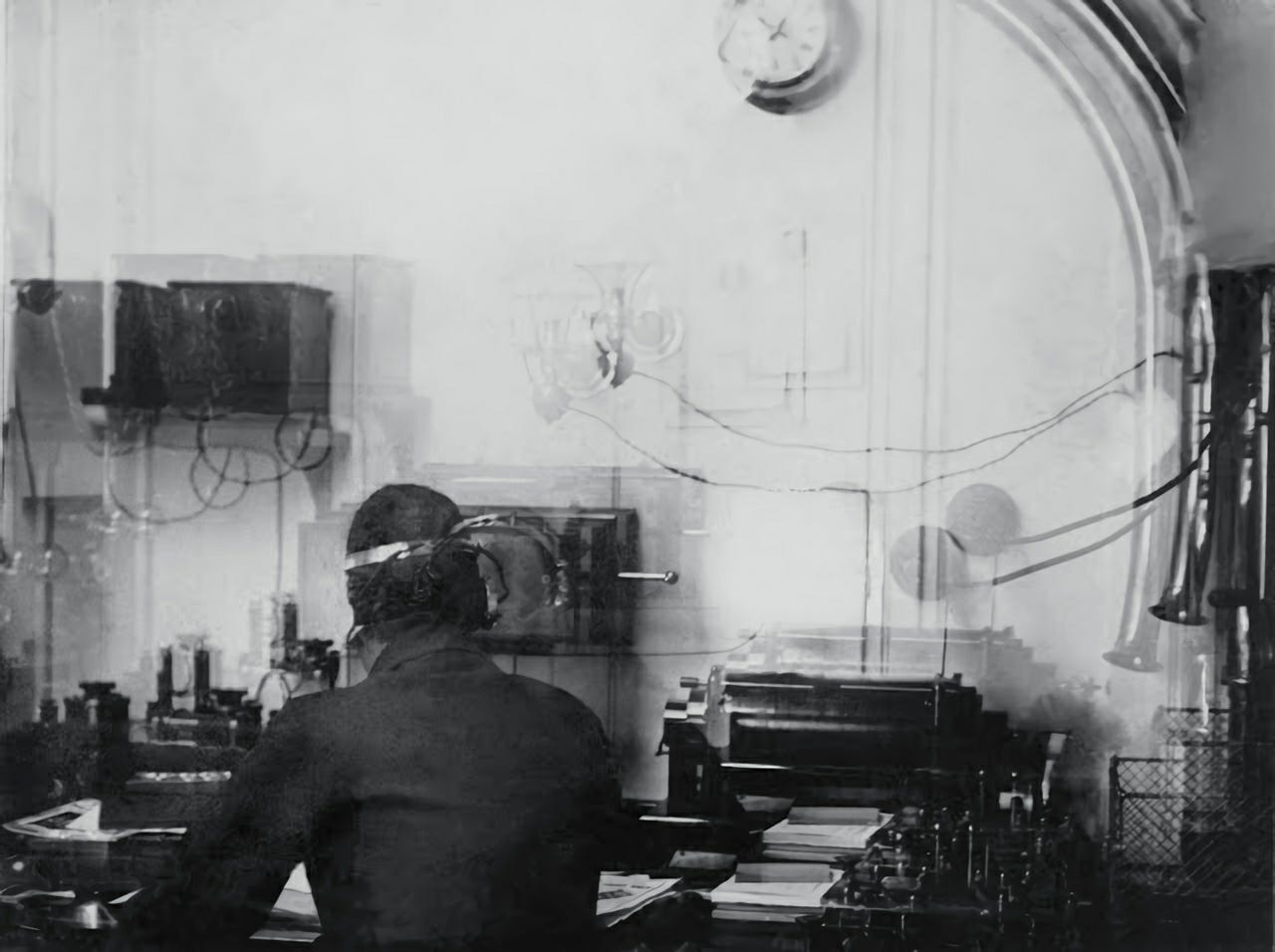
Titanic didn’t just expose a tragedy — it exposed a system that wasn’t ready. Continuous radio watch wasn’t required. Distress handling wasn’t standardized. Critical warnings went unheard.
The aftermath led directly to the Radio Act of 1912, which brought structure to the airwaves: licensed operators, mandatory watches, and clear priority for distress traffic.
1925 — Hams Go Global
In April 1925, amateur radio operators from around the world gathered in Paris and did something ambitious: they organized.
The result was the International Amateur Radio Union, with Hiram Percy Maxim — co-founder of the ARRL — serving as its first president.
The mission was straightforward and urgent: give amateurs a unified voice in international spectrum negotiations, where commercial and government interests were already pressing in.
Nearly a century later, the IARU is still in that fight — protecting access, defending allocations, and making sure amateur radio remains more than just a historical footnote.
2000 — The Beginning of the End for Novice
On April 15, 2000, the Federal Communications Commission rolled out a sweeping overhaul of the amateur radio licensing system.
Six license classes were reduced to three. Testing was streamlined. The structure of entry into the hobby shifted.
The Novice license — once the on-ramp for generations of hams — wasn’t eliminated overnight, but this was the turning point. From here on, new operators largely entered through the Technician class, and the Novice began its quiet fade into history.
For decades, it had been the first signal for countless operators: limited privileges, simple exams, and just enough access to spark a lifelong pursuit.
It may be gone, but its imprint is everywhere — in the operators it created, and in the culture it helped build.
11 Signing Off
Vertical tabs
A pundit said to me: “You should be using vertical tabs in your web browser. It just works better.”
Instead of tabs across the top of the browser, vertical tabs are those same links positioned to the right or left side of the browser window. Making this change can give you more real estate (when you collapse the sidebar) for the content in front of you.
But it drove me nuts.
I tried it for about three days before I threw in the towel and reverted to tabs across the top of the browser. With normal tabs, the icons are larger. The lettering is larger. Yes, it consumes a bit more space in the browser, but I can actually see what those tabs say. I also have strong muscle memory about going to tabs across the top. I thought that three days would be long enough for me to start developing the habit of going to the sidebar, but I was wrong.
It’s true: vertical tabs use space better. Nevertheless, after trying that style, I chose to go back to what works nicely for me. I realized in this little experiment what a creature of habit I have become. I feel a bit more sane to not be fighting myself with every tab change.
Power bumps
I was in the middle of writing this issue when electrical power to the house started fluctuating. A steady rain is falling outside and it’s entirely possible that somewhere nearby, a tree fell on a power line or a vehicle hit a pole. I heard my uninterruptible power supply activate several times: click, click — click, click.
I don’t have everything on the UPS, just the most critical systems. My laptop has a battery so it doesn’t need the UPS. Some of my AllStar nodes have battery backup so they are not on the UPS. But other AllStar nodes, the cable modem, and the router are attached to the UPS.
CyberPower CP1000AVRLCD Intelligent LCD UPS Battery Backup and Surge Protector, 1000VA/600W, 9 Outlets, AVR, Mini-Tower, UL Certified (affiliate link)
Today, I’m very glad to have spent the money on this device!
EtherHam CDN hiccups
Several site visitors have reported missing images and content on the EtherHam.com site. The CDN company is trying something else so if you have a moment, please jump over to EtherHam.com, browse a few articles, and then let me know if any images are missing or can’t be loaded.
Icom IC-7300 MK2
I’ve been getting on the radio in the evening (rarely, early in the morning). My QRZ page shows the latest log entries. I’ve been working FT8 and slowly picking up more countries. It feels good to be more active on HF.
73, and remember to touch a radio every day!