

To Jon, Travis, and Ann: a huge Random Wire Thank You for your support!


1. QRV: Are You Ready?
Welcome to meteorological fall (September 1st). Astronomical fall lands on September 22nd, so I guess this is a “take your pick” kind of thing. For me, when the school buses start to slow my rate of travel between the lake house and some barista-brewed coffee, that’s my signal fall has arrived.
I’ve been asked why I use the tagline “Remember to touch a radio every day” at the close of every Random Wire newsletter. My answer is both simple and perhaps not so simple. On the simple side, when you use a radio frequently, you tend to continue to use a radio frequently. Simple.
The more complex answer is that when you remember to incorporate radio into your everyday life in some way, it becomes more a part of who you are. It lives closer to the surface of your thoughts. You begin to see commonplace things and wonder: how could that be adapted to support my radio play?
And I think it is in that space that we become more involved, more engaged, and more excited about the many ways radio touches our lives.
My tagline is a gentle reminder to work toward having that kind of indispensable relationship with radio, because as we already know, radio touches all of us in some way, every day.
RW/EH Community Resources
EtherHam at https://etherham.com
EtherHam store at https://etherham.printful.me/
Groups.io at https://groups.io/g/EtherHam
GitHub at https://github.com/EtherHamRadio
Random Wire at https://www.randomwire.us
Random Wire Facebook at https://www.facebook.com/RandomWireReview
Random Wire Search at https://etherham.com/rw_search/
And there are still some slots left in the EtherHam groups.io space. Join at https://groups.io/g/EtherHam.
2. New on EtherHam
There is some meaty content on EtherHam.com this week. First up is trying to get OpenRTX running on a Retevis C62 for M17, and unfortunately, it’s just not there yet. Then I modified my “shutdown your ASL3 node with three quick key-ups” script, based on reader input. The third item is the start of a three-part series on automatic transcribing of AllStar nets, but guess what? That really means it can capture any voice traffic on AllStar.
Flashing OpenRTX for M17 on the Retevis C62: Almost There
The Retevis C62 is one of the more interesting radios to land in the M17 space. Unlike the RT3S and other MD-UV380-class radios — where M17 requires physical hardware modifications, SMD rework and fine wire work — the C62 is a firmware-only target. No soldering. Flash it over the programming jack and you’re done.
That’s the promise. This is a field report on how far you can actually get today, written after a full day at the bench with a charged radio, three programming cables and a working build.
Short version: the flashing pipeline works and is now well understood. The firmware doesn’t boot yet. Both halves of that are worth documenting for those of us experimenting with this.
Addendum to: Shutdown an ASL3 Node with Three Key-Ups
A reader (thank you, Bill) wrote in after upgrading a SHARI Pi3U (kits4hams) node from HamVOIP to ASL3. He’d had a pushbutton triggering shutdown just fine before, and gave this script a try — but found three quick key-ups weren’t being recognized. He got it working by bumping WINDOW_SEC up to 10, and specifically by keying up, waiting for his node’s ack/courtesy tone to finish, then keying up again — repeating that three times.
The addendum documents my thoughts about the cause of this condition, and the solution. And then I did what I should have done in the first place: published the script to a proper GitHub repository.
Automatic Net Logging, Part 1: Who It’s For, and Getting Audio Out of a Hub Node
An idle AllStarLink hub node — no radio attached, nothing plugged into it but power and Ethernet — turns out to be a good place to record and transcribe net traffic. Part 1 covers three quite different people who'd want that: someone logging nets, a repeater owner who wants a searchable record of what happens on their machine, and an operator who can't follow the audio and would rather read it. They need the same pipeline set up differently — the net logger would rather it mistake a rag chew for a net than miss a real one, and the repeater owner wants exactly the reverse.
It’s built on the KK7NQN-TranscriptionLogger project by Hunter Inman KK7NQN, with the audio capture, transcription step and a web viewer added. There’s an awkward bit, too, which is how you record from a node that has no receiver and therefore never fires the event every guide tells you to watch for. Over three days my system captured five live nets across four repeaters and turned up four real bugs, one of them quietly discarding sixteen percent of everything it recorded. Parts 2 and 3 cover those. The code is on GitHub if you’d rather read Python than prose.
One thing in there is worth thirty seconds of your time even if transcription doesn’t interest you at all: check whether your node’s Asterisk Manager Interface is bound to 0.0.0.0. Mine was — port 5038 open to the internet and being actively scanned. One line in manager.conf fixes it.
Weekly Report: September 3, 2026
This week, the Short Stack from the Interwebs is added to the Weekly Report!
The higher HF bands, especially 10, 15, and 20 meters, should be in fine shape for both DX chasing and regional contacts.
AllStarLink code received a batch of stability fixes. The Hams Over IIP wiki was updated with a MicroSIP navigation page.
The top three monitored Groups.io groups are Repeater Builder (205 messages), TinySA (70 messages), and APRS (59 messages). Runners-up include: HotSpot Radios, M17 Users, SHARI, and 44Net Connect.
3. Ham Radio Workbench #269 on AllStarLink
I included the link to this podcast last week, and I include it again this week because it’s just such a great show.
George and the HRWB team kept me company on a drive from the lake house to Portland last Sunday. I’ve been playing in the AllStar space for several years, but I learned quite a few new things, and developed a better understanding of how AllStar works. If you are interested in AllStar, this is worth listening to. It has information for AllStar beginners and aficionados alike.
And Jason dropped some great gems toward the end of the show. He also mentions the Ampersand-ASL project by Bruce MacKinnon, which I’m running on a couple of different devices (but start here if you’re interested in running this software).
One tidbit I particularly enjoyed was learning how the AllStarLink system was designed to avoid a typical star topology (hub and spokes). The federated distribution style of the AllStar ecosystem appeals to me.
The show closes with a live demonstration of Mike Walker VA3MW getting his node up and running, then connecting to nodes for other show members.
AllStarLink is an all-volunteer effort and they need support:
The implementation of this system and its monthly upkeep is very costly. Any monetary help that you can and wish to give will be much appreciated. Allstarlink Inc. is a 501(c)(3) non-profit organization.
You’ll get a thank you when you donate:

4. FreeDV RADE: For Your FlexRadio and Your Pi
ARDC has published a great introduction to FreeDV RADE, the open-source digital voice mode that swaps the usual DSP tricks for a machine-learning “radio autoencoder.” The pitch: SSB-beating voice quality down to -2 dB SNR, in about 1.5 kHz of bandwidth — half what SSB needs. It’s now built directly into FlexRadio’s 6000/8000/Aurora line as a selectable mode, but you don’t need one of those to try it — it runs just fine on a Raspberry Pi 4 or 5.
If you’ve ever had trouble picking voices out of the noise on HF, RADE might make the band feel accessible again. Hams in Australia, Japan, Europe, and South America are already running weekly RADE nets; VK3TPM says it’s noticeably easier on the ears than analog HF.
RADE v2 is in the works, targeting sub-1kHz bandwidth!
Learn more: FreeDV RADE: A New Approach to Digital Voice Over HF
5. Hunter’s Transcription Script
I can’t always listen to a net, even when I really do want the learning that comes from hearing so many great questions and answers. Then I remembered Hunter Inman's KK7NQN Transcription Logger project from the first Zero Retries Digital Conference and decided to give it a try on a spare AllStar node. Read Hunter’s overview at https://kk7nqn.net/. It is pretty amazing stuff.
However, getting it working required inferring some information and making some choices. A key choice for me was to use regular expressions instead of an AI for some transcription tasks. The system also tries to detect whether it has captured a net. Just like me, it does struggle with call signs.
Ultimately, I forked Hunter’s code and incorporated some fixes, including some new files. One of those was creating a simple transcript viewer web page. That saves me from having to SSH into the node and run a complicated MySQL query just to see a transcript. The Transcript Viewer lets me use date selectors to set a start and end date/time for the query. The query output is parsed into a table, and the transcript is downloadable as a text file.
I tested it on Sunday evening with the Puget Sound Repeater Group’s 9 O’Clock net:
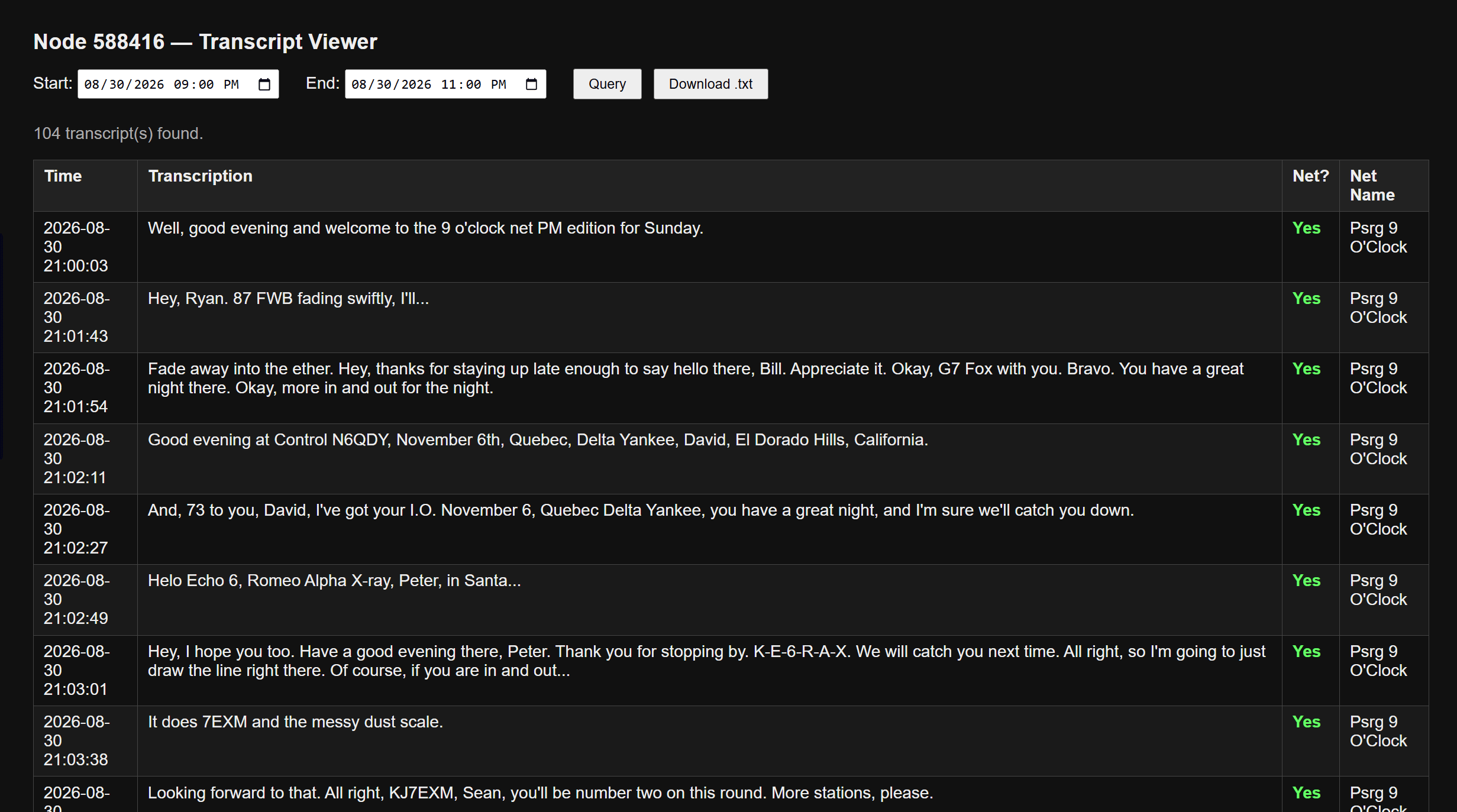
This showed the system is working. Then I tried using my local OpenWebUI machine running gemma3:4b to generate a net summary and correct some call signs, but it was slow. The call sign detection wasn’t much better than what I could do just by reading the transcript. However, I can feed that text file to an online AI (I used ChatGPT) to get an acceptable summary, if desired. With this one test, I think the RegEx transcript will usually be good enough.
I tested the logger again on Monday morning with the WA7ABU TechNet, a daily net at 10 AM Pacific that is often jam-packed with great technical information.
The script I implemented, plus the transcript viewer, are available on GitHub if someone wants to experiment with it.
As noted above in the New on EtherHam section, Part 1 is published: Automatic Net Logging, Part 1: Who It’s For, and Getting Audio Out of a Hub Node
Part 2 (Automatic Net Logging, Part 2: What Five Live Nets Taught) will publish on September 8, and Part 3 (Automatic Net Logging, Part 3: The Bug That Ate 16 Percent) on September 15.
When Making the AI Smarter Made It Worse
The net logger on AllStar node 588416 has been running well enough that I’ve moved on to its weakest part: call signs. Whisper hears “Whiskey Bravo 3, Charlie, Sierra Yankee” and writes exactly that — which is useless if what you want in the log is WB3CSY. The obvious fix is a bigger transcription model, so Wednesday I sat down to benchmark one.
It didn’t work, and neither did the next two things I tried. Whisper medium is nearly three times slower than small on that little i5 computer, and on the clips that actually contained call signs, it won one and lost one across seven tests. Where it lost, it lost badly: “Kilo foxtrot zero Sierra Mike Delta” came back as “Kilo, Flaxstrad 0, Sierra, Mike Delta.” Flaxstrad isn’t a word. Conversely, the smaller model had transcribed it correctly.
So I tried priming instead — feeding Whisper the phonetic alphabet and a list of call signs it should expect. On a transmission with nothing intelligible in it at all, the primed model produced “KJ7T-OR.” That’s my own callsign, which I had put in the primer. It hadn’t heard anything; it just gave me back what I’d told it to look for, formatted to look exactly like a real check-in. Hotwords, the third approach, mangled “Sierra Alpha Yankee” into “ALFAYANKI” — which made me laugh, and which is also unrecoverable.
The pattern took me a while to see. A bigger language model has a stronger sense of what English is supposed to sound like, and the phonetic alphabet is deliberately built from words that don’t sound like ordinary English. They are unique more than normal. That’s the whole point of it. So the model’s instincts, which help everywhere else, actively fight this particular vocabulary. Priming makes it worse, because a model told to expect call signs will manufacture one out of thin air.
What finally worked was about forty lines of Python and a lookup table. small‘s literal, unclever transcription turns out to be the most useful output available, precisely because it doesn’t try to be smart — “Whiskey Bravo 3, Charlie, Sierra Yankee” converts to WB3CSY every time, reproducibly, with no AI model involved. Running it across 1,754 transmissions found more than thirty call signs that no regex could see, because they’d only ever been spoken phonetically. It also turned up a failure mode I hadn’t noticed: the first phonetic word of a call sign goes missing constantly, almost certainly caused by PTT key-up clipping at the start of the transmission. Even the net control operator’s own call sign came through truncated three times in one net.
The best part came last. Digging through Hunter Inman’s (KK7NQN) original database schema, I found he’d already built the lookup table I needed. He included a corrections table with the phonetic alphabet in it, including “king” and “box” from the old military alphabet that still sees plenty of use on the air, plus manglings he’d collected in the field. My resolver now reads from his table. Adding a new correction is one line of SQL instead of a code change.
The code and the full write-up are in the GitHub repo, and parts 2 and 3 in the series are scheduled for publication. As additional refinements are put in play, it’s possible a part 4 will emerge.
6. DroidStar 9M2PJU Mod Update
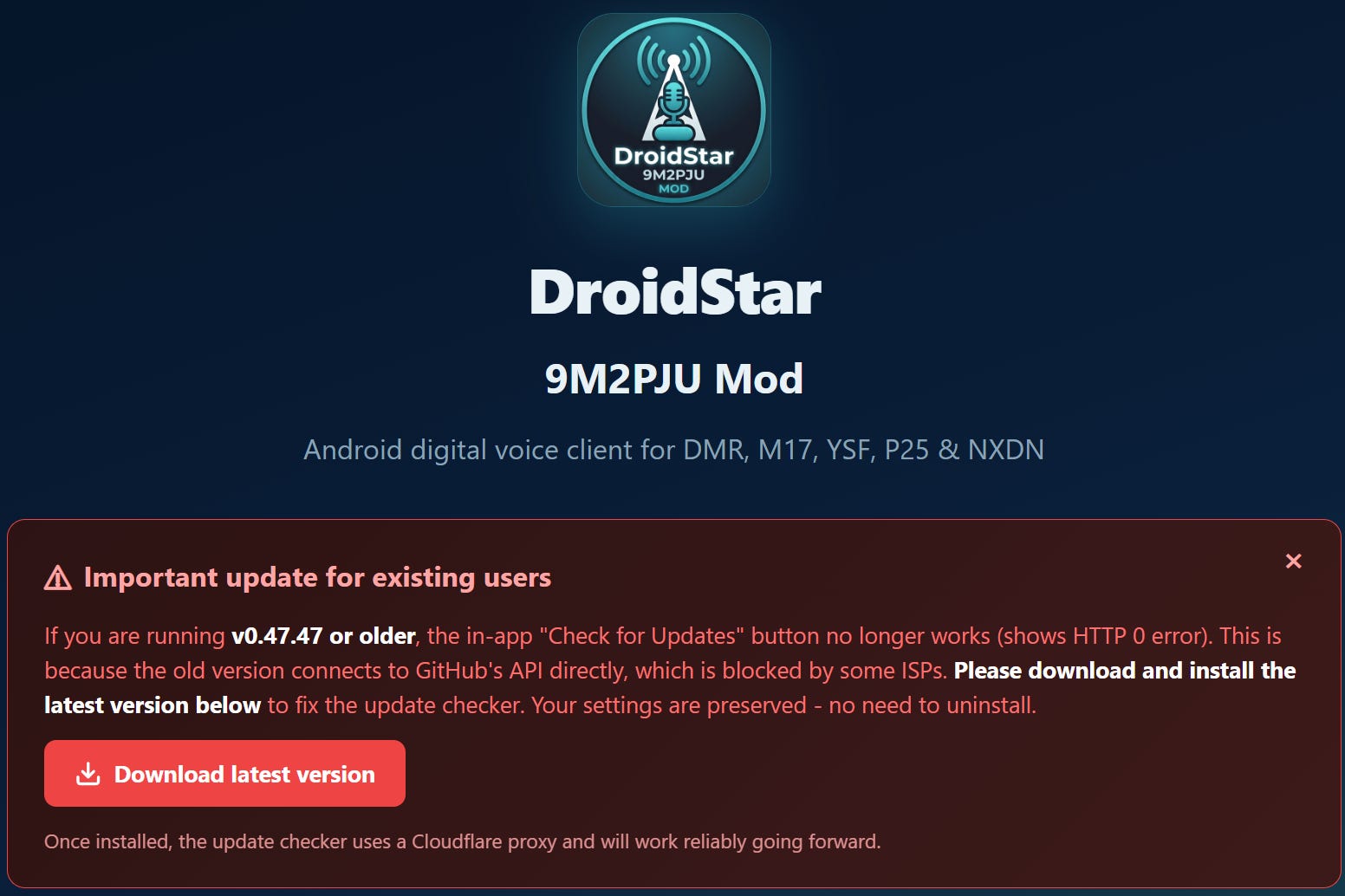
It turns out the DroidStar 9M2PJU Mod app has an update available, but you won’t find it on the Google Play Store. Go to https://droidstar.hamradio.my/ for the link to download the APK directly (but be prepared for nag screens — I counted six popups before I could proceed).
7. New and Notable: Nexus Amateur Radio Software
I picked this up from the Tuesday Project and Ham Radio Hobby Net on the WA7ABU 145.29 MHz repeater (also on AllStar node 51018). I was driving from Portland to the lake house Tuesday evening, so I had my node 588416 connected to 51018 to capture the net and catch up on it later — see the note on Hunter’s Transcription Script above. Glad I did, because I would have missed this otherwise.
Brett KG7GDB brought up a program called Nexus Modern Operating Workstation and described it as an ambitious attempt to fold a bunch of familiar ham radio applications into one modern environment. According to the net, Nexus handles:
Rig control
WSJT-X-style digital modes, including FT8 and FT4
APRS — beaconing, messaging, mapping, following other stations, weather
Slow-scan television
Logging
A waterfall display and modern GUI
Most of that already exists somewhere else. What caught my ear was having it all in one place. Anyone who’s built a digital-mode station knows how the software stack creeps — one program for the radio, another for FT8, a third for logging, maybe a fourth for APRS, each one wanting its own serial port or audio device or CAT interface. It works, but it gets tangled. An integrated app could cut down on that.
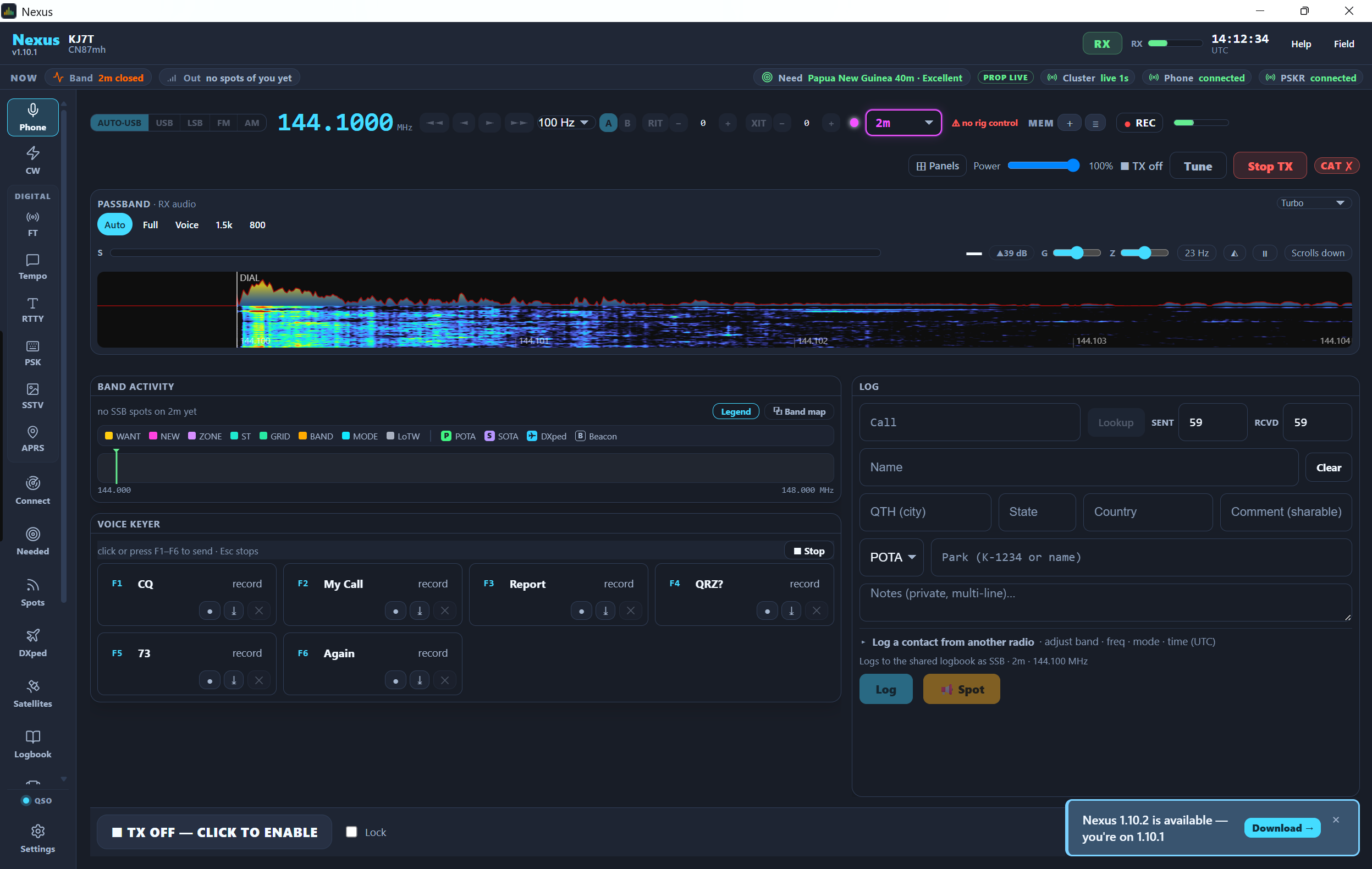
The APRS talk tied back to some recent conversation the group’s had about projects for radios like the Icom IC-7100. On the SSTV side, nobody had actually put hours into it yet — this was more of a “hey, look what I found” than a review. That’s usually how these things start.
Rob AJ7HR zeroed in on two details: Nexus is GPL-3 open source, and it’s written in Rust. He’d like to see more open-source software in the hobby — a lot of what we depend on is excellent, but plenty of it is tied to one platform, one maintainer, or one development model, and open source gives the community more room to poke at it and keep it alive. Rob also admitted Nexus had already gone farther than the all-in-one app he’d once thought about building himself. I think every technically minded ham has had that “I should build something like that someday” thought, right before someone else does.
It also runs everywhere — Raspberry Pi, Linux (.deb and AppImage builds), Windows, and macOS, including Apple Silicon per Brett. For a hobby that runs on everything from Pi Zeros to Windows shacks to Macs, that cross-platform reach matters.
Nobody on the net claimed Nexus replaces WSJT-X, your logging program, or your rig control software. But it generated enough interest that I’m filing it under “worth downloading and trying.” That’s usually how it goes: one ham finds something, another notices it’s open source, somebody else wonders how it’d fit their station, and pretty soon three people are experimenting. That’s a lot of how amateur radio actually gets done.
8. Meet CORE
I was introduced to the Central Ohio Radio Enthusiasts (CORE, at https://core.radio) by Justin KF8DEU. I have to say: this sounds like my kind of radio club!
From Justin:
It’s a radio club in a very broad sense, as in we talk about not only amateur radio but pretty much ANYTHING radio (mesh technologies, digital radios, reticulum, weather balloons, SDRs, etc) and meet once per month, listen to whoever wants to present something to us, while eating pizza.
Tech talk, radios, and pizza. Sounds like a winning combination! Kudos to the CORE team. They are active on Discord.
9. Configured a Spare DMR Hotspot
Digging through some storage bins, I ran across my first homebuilt hotspot, made with a Raspberry Pi 3 board, a duplex MMDVM board, and a C4 Labs case. Cosmetically, it looks identical to the later RPi 4 hotspot I built.
After futzing with it for a while to get the configuration right, I downloaded a backup of the working RPi 4 hotspot and restored that config to the RPi 3 hotspot. That worked perfectly…probably because the MMDVM board was exactly the same.
Along the way, I realized I only want to use one hotspot for PNWDigital traffic. The Retevis RT3S is flashed with the PNWDigital codeplug, so it’s already set up that way. The hotspot is configured to reach Brandmeister first and PNWDigital second. I’m thinking now this doesn’t make a lot of sense.
10. Forgotten: My ADSB Exchange Machine
On a recent trip to the Portland, Oregon QTH, I pulled up my router admin dashboard to make sure firmware was up to date. And then I noticed a machine in my client list I had completely forgotten about, named adsbexchange.
I had covered this more than two years ago in Random Wire 87.
The other thing I had forgotten was Tailscale running on my local-to-Portland ADSB machine. So I logged in, updated the Debian operating system, and made sure Tailscale was updated.
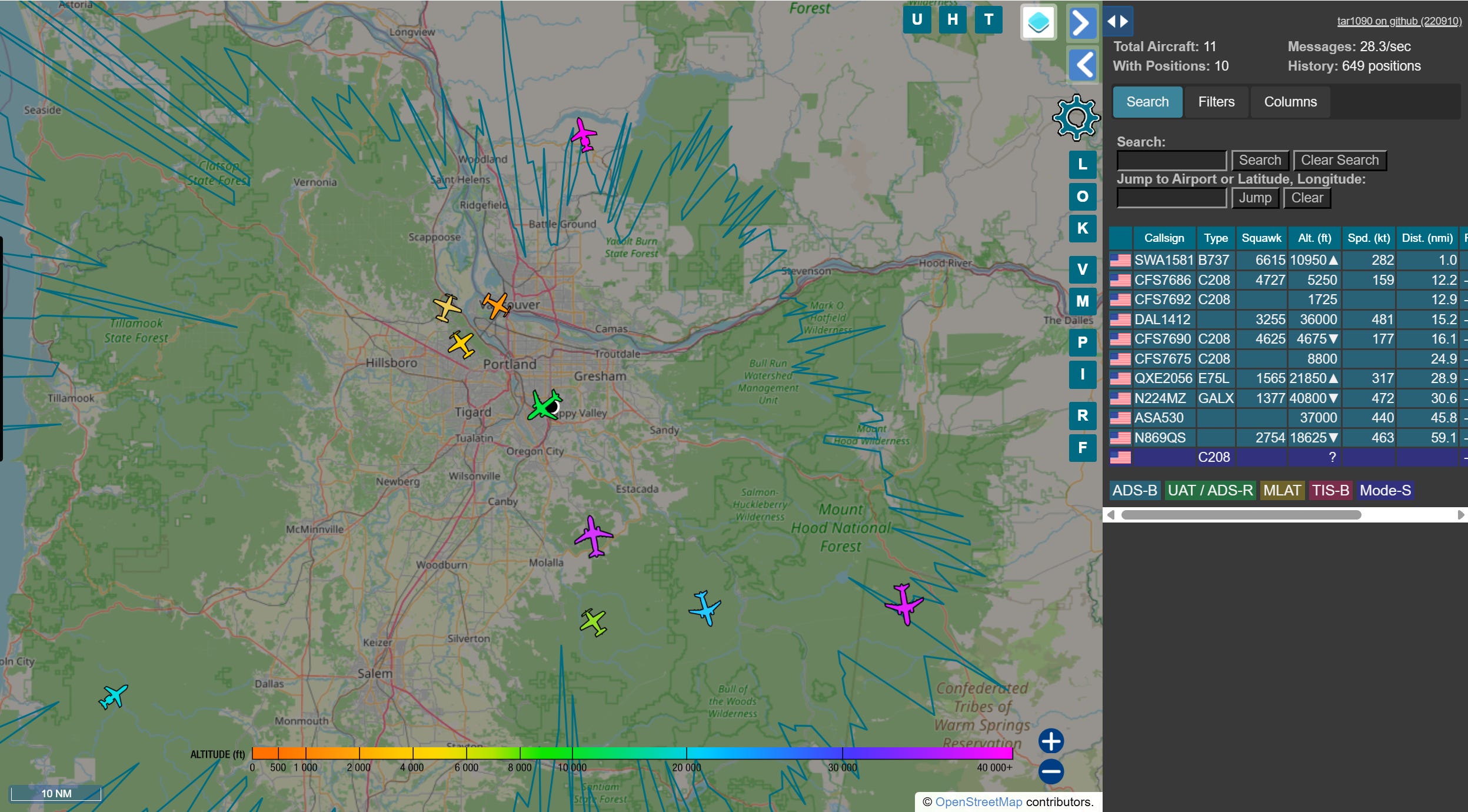
When I got back to the Lake House, I opened the Tailscale address for the machine and there it was: my flight tracker running in Portland, showing on my laptop more than 100 miles away.
I’m surprised at the coverage I’m getting with this simple antenna, mounted inside by the sliding glass doors on the ground floor:
Upgrade Version Loop Antenna MLA-30+ Plus 0.5-30MHz Rainproof Ring Active Receive Antenna Low Noise Medium Short Wave (this is an affiliate link)
The ADSB Exchange dongle for my Raspberry Pi is no longer listed on Amazon. Try the ADSBx Hardware page if you’re interested in flight tracking.
11. Gadgets
Pocket AI Recorder
I put this off for several months, but finally pulled the trigger on the Pocket recording device (https://heypocket.com/pages/pocket). It is billed as being your personal AI assistant.
Is it life changing? No. Is it helpful? Yes. I’ve started using it to listen alongside me while I monitor nets. The post-net AI-produced summary is generally good enough to provide a solid overview of the topic discussed. Pocket doesn’t do well recognizing different voices, so when there is a statement in the summary that Tom said something, I have to take that with a big grain of salt. But overall, I’m glad I made this purchase.
The M17 Net summary below was generated by Pocket AI. It listened to the net, presented me with a written summary, and I made corrections and some edits for easier reading. Pocket AI, like other AI engines, really has difficulty with amateur radio call signs.
This session was recorded live from the Tulsa Maker Faire (Maker Fest), where Jeff (AE5ME) served as Net Control for the weekly M17 digital voice net on the Kansas Citywide system. The meeting focused on technical updates for the M17 protocol, the M7 application, and upcoming amateur radio events.
M17 Protocol & Hardware Updates
LinHD Project: Development continues on the Linux-based handheld (LinHD). A “Revision C” design is forthcoming. The project utilizes the Retevis C62 as a donor for the case, keyboard, and display.
Hardware Compatibility: Participants emphasized using the English version of the Retevis C62 rather than the European version to ensure compatibility.
OpenRTX Firmware: Version 0.1 is approaching release, which will introduce packet and SMS engine capabilities. Supported hardware includes the CS750, M17 Plus, and Module 17 boards.
Hotspot Options: For high-performance M17 hotspots, the CC1200 and SX1255 boards were recommended over standard MMDVM/Raspberry Pi hats due to superior signal purity.
M7 Application Development
Greg provided a status report on the MSeven app:
Scan Feature: New functionality allows scanning across multiple reflectors and channels.
Dual-Receive Modes: Users can choose between a “stop and listen” mode (full audio for a set duration) or a “priority” mode where the active channel plays at full volume while others are ducked to 30%.
Hardware Pairing: The app successfully pairs with the Mobilinkd TNC4, enabling M17 operation on any 9600-baud capable radio.
Community & Events
Zero Retries Conference: Scheduled for October in San Ramon (about 35 miles east of San Francisco). Jeff confirmed he will attend in person to present on M17, noting that a Zoom attendance option is available for those unable to travel.
Maker Movement: Jeff highlighted the 10th anniversary of the Maker Faire, emphasizing the importance of organic, non-commercial development in amateur radio to attract younger generations (STEM/youth groups).
Zero Retries Info: Registration and details are available at
www.zeroretries.org/p/conference.
Net Operations
Due to the high-noise environment at the Maker Faire (35 dB to 50 dB noise floor), the National Traffic System (NTS) portion of the net was bypassed. Technical discussions and check-ins were prioritized via both RF and the netcontrol.live text stream.
I have no experience with other devices that purport to do the same thing, so I can’t make recommendations. I can tell you where Pocket falls down, and that is Bluetooth…because there is no Bluetooth. If it had Bluetooth, maybe a phone call over a headset or earbuds could be picked up. As it is, it only picks up my side of that conversation. The solution is to use the speakerphone function.
I’m not going to touch on privacy laws, since every state has something a little different. My state is a dual consent state (both sides have to agree) so I usually don’t bother with Pocket on phone calls.
Cute Little Radio Project
It’s not two-way radio, but it’s still radio. It’s an ESP32-based web radio, says this Blogspot post:
I built this ESP32 based web radio this week. I’ve used a 1.9” IPS display with ST7789 driver. For the audio I’ve used MAX98357A I2S audio amplifier. This web radio is based on the excellent yoRadio project https://github.com/e2002/yoradio
I’ve said it many times: I like small devices. This build is certainly small!
12. QRT: End Transmission
It was a hectic weekend-ish time. I made three day trips to Portland: one on Friday, one on Sunday, and one on Tuesday. Sunday was particularly long as I climbed into the pickup at 5:30 am and got back to the Lake House around 8 pm. Lots of driving, but that also meant time for audio books, listening to nets, and not-to-be-missed: listening to the Ham Radio Workbench podcast.
Debian 13
I lean heavily on Debian Linux, particularly Debian 13. That is usually my “go to” distro. Turns out I’m in good company. CERN is implementing Debian 13. I guess if it’s good enough for high-energy particle physics, it’s good enough for my home lab!
146.52
I don’t hear hams on 146.52 MHz very often up in the Olympia, Washington area, but it is quite common to hear traffic in Portland, Oregon and Vancouver, Washington. In Portland and Vancouver, 146.52 is treated more as a simplex channel for sometimes long conversations. I don’t think I’ve ever heard a contact in that area on 146.52 followed by a request to QSY to a different frequency. Different places, different customs. Always interesting.
Mobile antenna
And with three round trips, I got to test what was going on with my VHF/UHF antenna on the pickup. I’ve had good luck with Comet antennas, so the dual-bander on the truck is the Comet SS680SB. But something is wrong: when my Yaesu FTM-300DR transmits an APRS beacon, the radio shuts off. I thought: must be high SWR, I’ll check it. I pulled out my RigExpert STICK-500 analyzer and measured a very acceptable SWR below 1.3 near the APRS frequency. So I hooked up the radio again and as soon as it beaconed, it shut off.
I had a spare antenna under the seat, named for my good friend Justin Case. That antenna is a mag-mount dual-band COMPACtenna. Before connecting it to the radio, I measured the SWR and found it was well above 2…but that’s still acceptable. And here’s the part that doesn’t make any sense to me: the radio works fine with the COMPACtenna.
Of course, I’ve had that antenna on the roof of the pickup for more than two years. It’s seen a lot: rain, snow, hail, rocks, tree branches, a Washington-to-Texas road trip, and more. I live in western Washington so salt-laden moisture could be a factor. Maybe there is an intermittent connection that I missed when I tested the SWR. I’ve cleaned and tightened connections, but the radio still shuts down when it transmits an APRS beacon through the Comet antenna. I tested this over and over on my three long drives. (As I think about how the antenna is configured, I’ll bet it comes apart, which means I haven’t really cleaned all the connections yet.)
The next time I pop down to Portland, I’ll grab a spare antenna from the Justin Case antenna tube and try it on the same mount. If that works, then it’s the antenna. If the radio still shuts down, it’s the mount or feedline. In the meantime, my stubby COMPACtenna is doing the job for me.
73, and remember to touch a radio every day!

One quick addition to the transcript system on GitHub -- I added a note to the README that this is not for life safety use. A transcript is not a log. Transcripts have errors. That note is at https://github.com/EtherHamRadio/KK7NQN-TranscriptionLogger/blob/main/README.md#not-for-life-safety-use